👋
Blog Post
Technical SEO Audit Guide
The complete framework for diagnosing, prioritizing, and fixing crawlability, indexing, rendering, speed, structured data, and site-health issues.
Share

Technical SEO Audit Checklist : A Complete Checklist for Crawlability, Indexing, Speed, and Site Health
A technical SEO audit is not a “health check” you run once a year to produce a long spreadsheet nobody acts on. It is a decision system for answering five business-critical questions:
1. Can search engines reliably crawl the pages that matter?
2. Can they render and understand those pages correctly?
3. Are the right URLs being indexed and canonicalized?
4. Is the site fast and stable enough to support both rankings and conversion?
5. Are fixes prioritized in a way that improves visibility, efficiency, and revenue fastest?
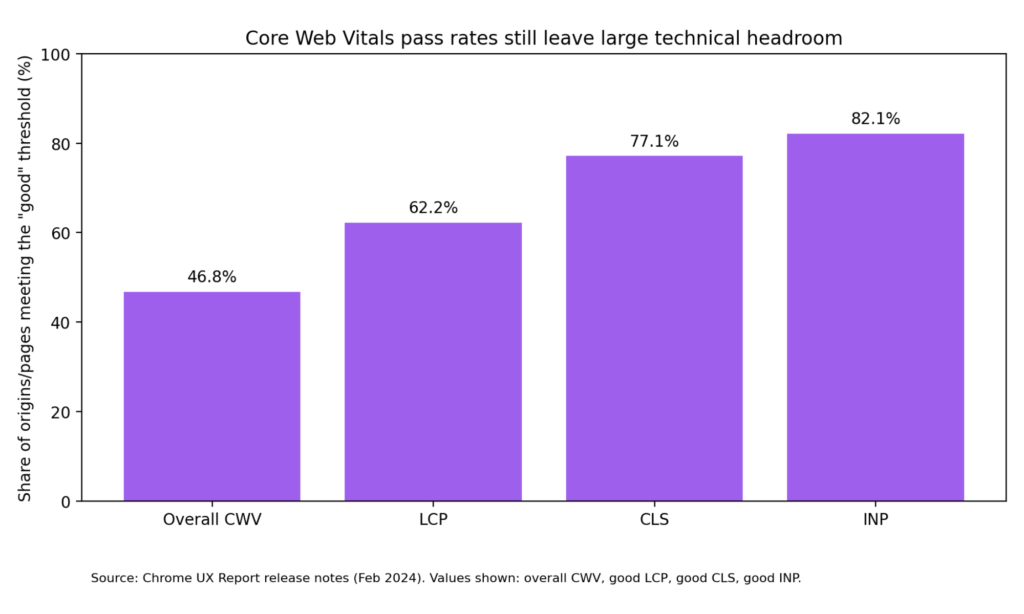
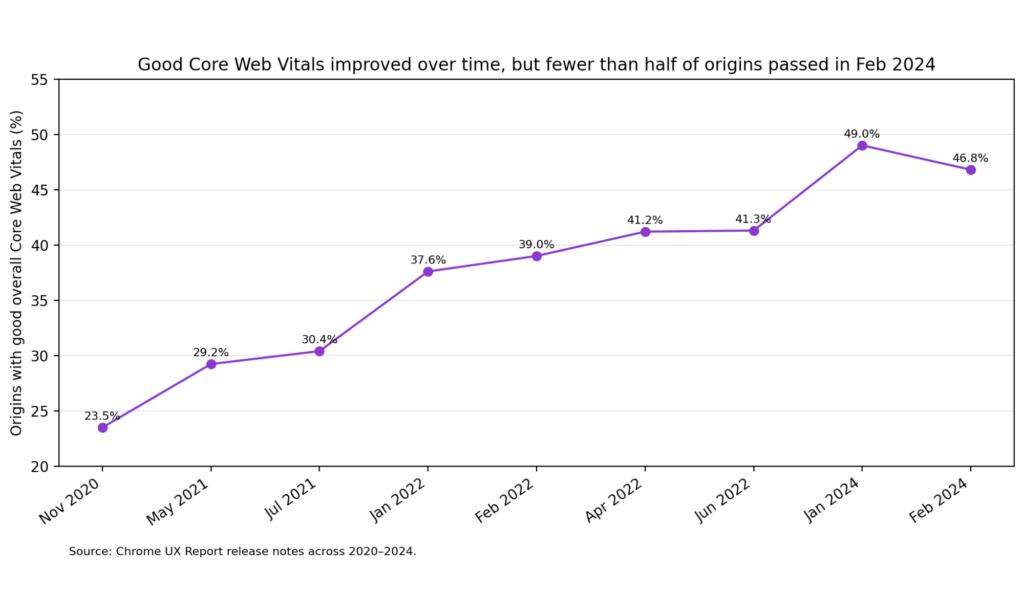
That matters because the data is still telling the same story: technical debt is widespread. In Chrome UX Report data, only 46.8% of origins had good overall Core Web Vitals, while 62.2% had good LCP, 77.1% good CLS, and 82.1% good INP. HTTP Archive’s 2024 SEO chapter reported that 54% of sites passed desktop Core Web Vitals, with 72% passing LCP, 97% passing INP, and 72% passing CLS. Its 2025 SEO chapter notes that LCP remains the biggest laggard on mobile, hovering around 55–60%, which means load performance is still the most persistent technical bottleneck on the modern web.
This guide gives you a complete audit framework you can use for service pages, blogs, SaaS websites, eCommerce stores, marketplaces, and multilingual sites. It is grounded in Google Search Central, web.dev, Chrome UX Report, HTTP Archive, and selected industry tools from Screaming Frog and Ahrefs for implementation workflows.
Why Technical SEO Audits Still Matter?
Technical SEO is the discipline of making a website easy for search engines to discover, crawl, render, index, and trust. Google itself defines technical SEO work in those terms: crawlability, indexation control, canonicalization, JavaScript handling, multilingual setup, structured data, sitemaps, redirects, and site moves all sit squarely inside the technical layer.
That does not mean technical SEO works in isolation. Google is explicit that there is no single “page experience signal”, that Core Web Vitals are used by ranking systems, and that relevant content can still rank even when page experience is not perfect. But this is exactly why technical SEO matters so much: when you already have relevant content, the technical layer determines whether that content gets discovered efficiently, interpreted correctly, and delivered in a user experience that supports engagement and conversion.
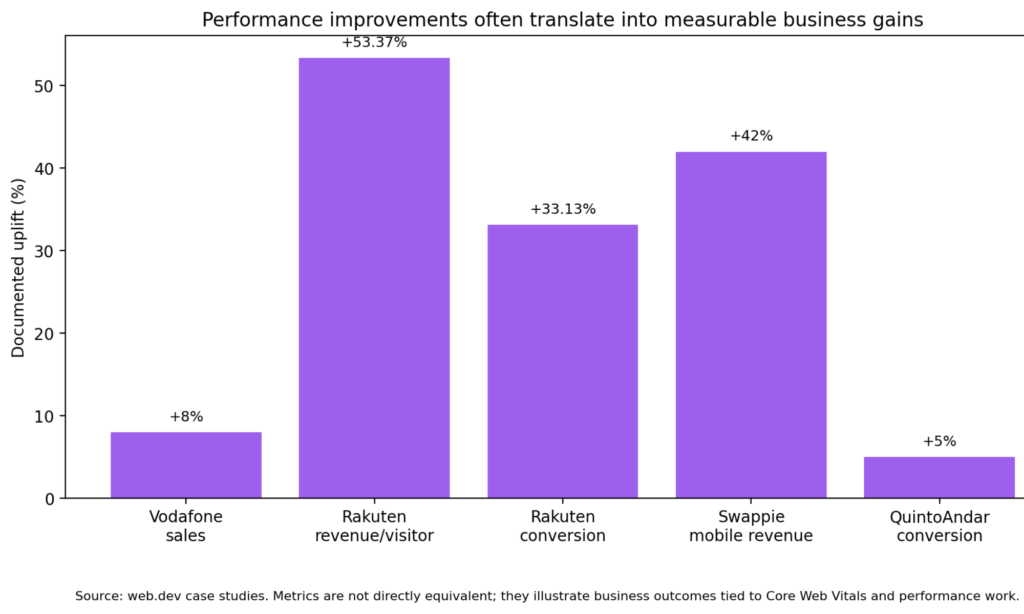
There is also a business reason to take audits seriously. Multiple web.dev case studies have shown that performance work can translate into real commercial gains:
Vodafone found that a 31% improvement in LCP led to 8% more sales.
Rakuten 24 reported 53.37% higher revenue per visitor and 33.13% higher conversion rate after investing in Core Web Vitals, while also observing that a good LCP could correspond to a 61.13% conversion increase.
Swappie increased mobile revenue by 42% after focusing on performance and Core Web Vitals.
QuintoAndar reported a 5% increase in conversions, an 87% increase in pages per session, and a 46% reduction in bounce rate after page performance work.
In other words, a technical SEO audit is not just about rankings. It is about removing friction across acquisition, discovery, user experience, and revenue.
What a Technical SEO Audit Should Cover
A serious audit should cover the following ten pillars:
1. Crawlability and indexability
2. Site architecture and internal linking
3. Status codes, redirects, and error handling
4. Canonicalization and duplicate management
5. JavaScript rendering and discoverability
6. Core Web Vitals and page performance
7. Structured data and SERP feature eligibility
8. International SEO and localization signals
9. Sitemaps, robots directives, and HTTP headers
10. Monitoring, governance, and post-fix validation
Many audits fail because they list issues but do not separate symptoms from causes. For example:
- “Low indexed pages” is a symptom.
- The causes may be `noindex`, blocked resources, weak internal links, soft 404s, wrong canonicals, broken pagination, or JS-rendered content that is not discoverable.
A good audit therefore works in layers:
Observe -> Diagnose -> Quantify -> Prioritize -> Validate
Before You Start: The Right Inputs
Before crawling the site, assemble the following:
• Access to Google Search Console
• Access to Google Analytics / GA4 or another analytics platform
• A crawler such as Screaming Frog SEO Spider or Ahrefs Site Audit
• PageSpeed Insights / Lighthouse and, ideally, real user monitoring
• Current XML sitemap(s)
• Deployment or engineering context
• CMS / framework details
• If possible, server logs for advanced crawl analysis
Recommended baseline exports
Create a working audit sheet with these tabs:
• URL inventory
• Indexability status
• Canonicals
• Status codes
• Redirect chains
• Internal links / orphan pages
• Core Web Vitals
• Structured data
• Hreflang
• Sitemap coverage
• Issue prioritization
• Fix status / owner / release date
This turns the audit from a report into an operating document.
Pillar 1: Crawlability and Indexability
This is the first gate. If a page cannot be crawled or indexed correctly, nothing else matters.
What to check
- Blocked paths in `robots.txt`
- `noindex` usage
- Canonical tags pointing elsewhere
- Non-indexable status codes
- Login walls / session gates / geo-blocking
- Parameterized URLs
- Soft 404 patterns
- Pages present in sitemap but not indexable
- Indexable pages missing from the sitemap
- Crawl-depth issues for key pages
The most common misconception: robots.txt vs noindex
Google’s robots.txt documentation is very clear: robots.txt is mainly for crawl control and avoiding overload; it is not a reliable way to keep a page out of Google. If you need a page removed from search results, Google recommends a `noindex` directive or password protection.
For page-level control, Google’s robots meta documentation states that you can use a robots meta tag in HTML pages, and for non-HTML resources such as PDFs, images, or video, an X-Robots-Tag HTTP header.
That distinction matters in real audits because teams often make one of these mistakes:
- They block a page in robots.txt and assume it will deindex.
- They add `noindex` but block the page so crawlers cannot see the directive.
- They forget to use `X-Robots-Tag` for files such as PDFs.
Audit questions
Ask these questions page-template by page-template:
- Which URLs should be indexable?
- Which URLs should be crawlable but not indexable?
- Which URLs should not be crawled at all?
- Which URLs exist only for users or application logic and should never surface in search?
What “good” looks like
A clean indexation model usually has:
- Indexable pages returning 200
- Self-referencing canonicals on canonical versions
- No accidental `noindex`
- No contradictory signals between robots, canonicals, and sitemaps
- XML sitemaps containing mostly canonical, indexable 200 URLs

Pillar 2: Site Architecture and Internal Linking
Search engines discover importance through structure as much as through content.
What to check
- Click depth to key pages
- Orphan pages
- Weak internal linking to money pages
- Broken breadcrumbs
- Faceted navigation crawl traps
- Infinite calendar / filter loops
- Inconsistent category hierarchy
- Pagination and next-step discovery
- HTML sitemap / hub pages where needed
Why this matters
A site with excellent content can still underperform because the architecture hides high-value pages deep inside the crawl path. Large sites especially need clean pathways from:
- Home → category → subcategory → product/service/article
- Editorial hubs → supporting articles
- Commercial pages → proof assets (case studies, FAQs, comparison pages)
- Footer / utility links → crawl waste reduction
What “good” looks like
- Important URLs reachable within a few clicks
- Contextual links between related content clusters
- Navigation supporting user intent and crawler discovery
- No indexable orphan pages unless there is a deliberate reason
A strong internal linking audit should also surface pages with:
- high impressions but low internal link support
- strong backlinks but weak crawl prominence
- rankings that plateau because supporting architecture is thin
Pillar 3: Status Codes, Redirects, and Error Handling
Status code hygiene is a foundational technical SEO discipline.
What to check
- 4xx errors
- 5xx errors
- Soft 404s
- Redirect chains
- Redirect loops
- Temporary redirects used permanently
- Internal links pointing to redirected URLs
- Canonical targets that redirect
- Redirects from non-canonical variations to canonical targets
Google’s redirect guidance explains that certain redirect types signal that the target should be treated as canonical, and that the choice of redirect depends on permanence and intent. Google’s guidance on soft 404s also makes clear that a URL that shows an error page while returning 200 OK is a poor pattern for both users and search engines.
Audit principles
- Use a 200 for real content.
- Use a 404/410 for removed content that has no replacement.
- Use a 301 for permanent moves where a relevant destination exists.
- Avoid chains such as A → B → C when A → C is possible.
- Update internal links so they point directly to the final destination.
What “good” looks like
- Minimal 5xx rate
- No chain/loop patterns on high-value pages
- Helpful 404 templates that still return a real 404/410
- No mass internal linking to redirected URLs
We wrote a practical, beginner-friendly digital marketing guide for small businesses. It covers everything from SEO to Paid Ads. Have a quick read & implement to scale your business.
Pillar 4: Canonicalization and Duplicate Control
Canonicalization decides which version of a duplicated or near-duplicated URL should be treated as the representative one.
Google defines canonicalization as the process of selecting the representative URL from a duplicate set so that only one version is shown in search results.
What creates duplicate clusters?
- URL parameters
- Tracking parameters
- HTTP vs HTTPS
- www vs non-www
- trailing slash inconsistencies
- uppercase/lowercase variations
- filtered category pages
- printer-friendly versions
- CMS archive duplication
- product variants
- syndicated or templated content
What to check
- Missing canonicals
- Multiple canonicals
- Canonicals pointing to non-200 URLs
- Canonicals pointing across unrelated templates
- Canonical chains
- Parameterized pages indexed instead of clean URLs
- Duplicate title / description clusters that hint at deeper duplication
Important nuance
Canonical tags are strong hints, not commands. If other signals contradict them—internal links, sitemaps, redirects, hreflang, content similarity, or status code behavior—search engines may choose a different canonical.
What “good” looks like
- One clean, self-referencing canonical on every canonical page
- Non-canonical variants resolving by redirect or canonical, ideally both coherently
- Canonical targets that are crawlable, indexable, and return 200
- Duplicate parameter pages controlled intentionally
Pillar 5: JavaScript SEO and Rendered Discoverability
Many modern websites fail technical SEO audits not because the HTML is broken, but because critical content or links only appear after complex JavaScript execution.
Google’s JavaScript SEO documentation explains that Google processes JavaScript web apps in three phases: crawling, rendering, and indexing. It also notes that Googlebot first checks whether crawling is allowed, and if resources or pages are blocked, Google may skip rendering the blocked assets or pages.
What to check
- Are critical links present in rendered HTML?
- Does key content depend on delayed client-side rendering?
- Are important resources blocked in robots.txt?
- Are headings, product data, FAQs, and internal links missing from the initial HTML?
- Are SPA routes discoverable with real links?
- Do pagination and filters rely on uncrawlable JS events?
Red flags
- A page looks complete to users but the raw HTML is nearly empty.
- Links only appear via `onclick` behavior and not actual anchor tags.
- Structured data is injected incorrectly or inconsistently.
- Important content appears only after long asynchronous calls.
What “good” looks like
- Key content and links available in the initial HTML where possible
- Server-side rendering or pre-rendering for critical templates
- Crawlable anchor-based navigation
- Render tests confirming parity between what users see and what search engines can process
Pillar 6: Core Web Vitals and Page Performance
Performance is where technical SEO, UX, and CRO intersect.
Google states that Core Web Vitals are used by ranking systems, but also emphasizes that they are not a magic lever and that there is no single page experience score. The current stable Core Web Vitals and thresholds are:
- LCP ≤ 2.5 seconds for good loading performance
- INP ≤ 200 ms for good responsiveness
- CLS 0.1 for good visual stability
Why this section belongs inside a technical SEO audit
Because performance issues frequently originate in technical architecture:
- render-blocking CSS/JS
- heavy templates
- oversized images
- third-party tags
- server latency
- hydration costs
- poor caching
- font strategy issues
- layout instability from ad containers or lazy-loaded media
HTTP Archive’s 2025 SEO chapter notes that CLS remains relatively strong, but LCP continues to lag on mobile, making load performance the most persistent web-wide problem.
What to check
- PageSpeed Insights field data and lab data
- Template-level CrUX performance
- Largest Contentful Paint element
- JavaScript execution and long tasks
- third-party script cost
- image payload / responsive image implementation
- font loading strategy
- cache headers and CDN behavior
- TTFB and backend latency
- layout shift sources
- interaction bottlenecks for forms, menus, filters, and product options
What “good” looks like
- Performance work focused on high-value templates first
- Real user monitoring layered on top of Lighthouse/PageSpeed
- Clear ownership between engineering, SEO, analytics, and product
Pillar 7: Structured Data and SERP Eligibility
Structured data helps Google understand entities and page types and may make pages eligible for rich results. But Google is explicit: using structured data does not guarantee that rich results will appear.
Google’s general guidelines state that structured data must:
- follow supported formats, with JSON-LD recommended
- represent the visible main content
- not be blocked from Googlebot
- meet technical and quality guidelines
- avoid misleading or hidden content
What to check
- Presence of eligible schema types
- Syntax errors
- required / recommended fields
- inconsistency between structured data and visible content
- images not crawlable
- outdated markup
- spammy or irrelevant structured data
- organization / website schema on the home page
- product, article, FAQ, breadcrumb, review, video, recipe, local business, job posting, and other relevant types based on the site
Important nuance
Google also notes that structured data issues can trigger a manual action for rich result eligibility, even when normal rankings are not directly affected.
What “good” looks like
- Correct schema on the right templates
- Alignment between markup and on-page content
- Validation through the Rich Results Test
- Ongoing monitoring after CMS or template changes
Pillar 8: International SEO and Hreflang
For multilingual or multi-regional websites, hreflang is one of the most frequent sources of technical SEO waste.
Google states that `hreflang` helps it understand localized variations of content, but that Google does not use hreflang or the HTML `lang` attribute to detect the page language; it uses its own algorithms for that.
What to check
- Missing return tags
- Incorrect language/region codes
- self-referencing hreflang missing
- hreflang pointing to non-canonical URLs
- hreflang clusters broken by redirects or `noindex`
- inconsistent canonicals between language variants
- `x-default` usage for language selectors or fallback pages
What “good” looks like
- Every localized page references its alternates and itself
- All hreflang targets are canonical, indexable, and 200
- Language switchers map to real equivalent pages
- Country and language logic is intentional, not mixed randomly
Pillar 9: Sitemaps, Robots Directives, and HTTP Headers
What to check
Sitemaps are often treated as housekeeping. In reality, they are diagnostic gold.
Google’s sitemap documentation describes a sitemap as a file that tells search engines which pages and files are important and can include information such as last update times and alternate language versions. But Google also states that submitting a sitemap is only a hint, not a guarantee that Google will crawl or use every listed URL.
- Sitemap contains only canonical 200 URLs
- Non-indexable URLs in sitemap
- Missing important URLs
- Lastmod inflation or nonsense dates
- Separate image/video/news sitemaps where relevant
- Sitemap index logic for large sites
- robots.txt references to sitemap
- X-Robots-Tag behavior for files
What “good” looks like
- Sitemap is a trustworthy index of URLs you actually want indexed
- Search Console sitemap reports align with expectations
- Sitemaps help discover gaps between “known by the business” and “discoverable by search engines”
Advanced note on AI surfaces
Google’s robots meta documentation now explicitly notes that directives like `nosnippet` and `max-snippet` affect not only web search snippets but also surfaces such as AI Overviews and AI Mode. That makes crawl and snippet controls more strategic than they used to be.
Pillar 10: Monitoring, Governance, and Post-Fix Validation
A technical SEO audit only becomes valuable when it changes the release process.
Build a recurring monitoring stack
At minimum, monitor:
- Search Console coverage / indexing shifts
- Search Console Core Web Vitals
- PageSpeed / CrUX trendlines
- 5xx and availability alerts
- template-level structured data tests
- redirect chain checks
- sitemap diff checks
- key internal link counts
- organic landing page performance by template
Re-crawl after every meaningful release
Do not assume the fix worked because code was deployed. Re-crawl the affected templates and verify:
- Status code changed as intended
- canonical targets are correct
- structured data validates
- LCP/INP/CLS improved on priority templates
- previously orphaned pages now have crawlable links
- Search Console signals start moving in the expected direction
This is where many agencies and in-house teams lose credibility. They stop at “recommendation delivered” instead of closing the loop.
At Full Traffic, we specialise in SEO Services – focussed on conversions over rankings. Hit the button below to know more.
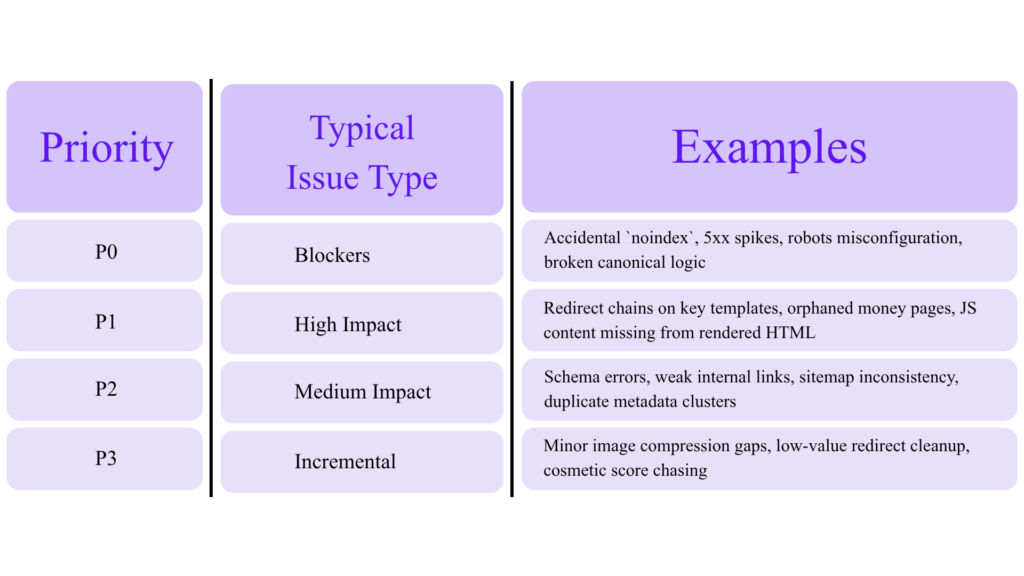
A Practical Priority Model
One reason technical SEO reports gather dust is that they overwhelm stakeholders with dozens or hundreds of issues of equal apparent importance. That is a mistake.
Use a simple scoring model:
Impact
How much can this affect:
- indexation
- rankings
- traffic
- conversion
- crawl efficiency
- revenue pages
Scale
Is the issue:
- one URL
- one section
- one template
- sitewide
Effort
How difficult is the fix:
- content/config only
- CMS template change
- front-end refactor
- back-end/platform work
Risk
Can the fix:
- deindex pages
- break analytics
- alter URL logic
- affect international clusters
- change rendering behavior
Priority table
Rule of thumb
Fix indexation and crawl blockers first, then template-level architecture/performance issues, then enhancement opportunities.
The Audit Checklist You Can Actually Use
Below is a condensed field checklist.
Crawlability and indexation
☐ Crawl the site and export all URLs
☐ Segment by indexable vs non-indexable
☐ Review robots.txt
☐ Review meta robots and X-Robots-Tag
☐ Compare sitemap URLs to indexable URLs
☐ Review Search Console indexing reports
☐ Check soft 404s, duplicates, crawled-not-indexed, discovered-not-indexed
Architecture and links
☐ Measure click depth to key pages
☐ Identify orphan URLs
☐ Check breadcrumb structure
☐ Review contextual internal links
☐ Identify crawl traps / faceted waste
☐ Audit anchor consistency
Status codes and redirects
☐ Export 3xx, 4xx, 5xx URLs
☐ Identify chains and loops
☐ Update internal links to final destinations
☐ Review 404 template behavior
☐ Replace permanent 302 patterns where appropriate
Canonicalization
☐ Validate self-referencing canonicals
☐ Check conflicting canonicals
☐ Check canonical targets return 200
☐ Review parameter handling
☐ Confirm canonical consistency across hreflang clusters
Rendering and JS
☐ Compare rendered vs raw HTML
☐ Test discoverability of JS-inserted links
☐ Check blocked resources
☐ Review client-side routing patterns
☐ Verify important content exists without delayed hydration issues
Performance
☐ Benchmark top templates in PSI/Lighthouse
☐ Pull CrUX/Search Console CWV
☐ Identify largest LCP elements
☐ Review third-party script budget
☐ Audit image delivery, font loading, and main-thread tasks
☐ Prioritize high-traffic and high-conversion pages first
Structured data
☐ Validate Rich Results eligibility
☐ Review required and recommended fields
☐ Ensure markup matches visible content
☐ Check image crawlability
☐ Monitor for manual action risk patterns
International SEO
☐ Validate hreflang syntax
☐ Check return tags
☐ Check self references
☐ Check canonical-hreflang consistency
☐ Review `x-default
Sitemaps and headers
☐ Ensure sitemaps contain canonical 200 URLs
☐ Check lastmod quality
☐ Validate robots.txt sitemap declarations
☐ Review header directives for files (PDFs, images, video)
Governance
☐ Assign issue owner
☐ Set deployment target
☐ Re-crawl after fix
☐ Track Search Console and business impact
What a Good Audit Report Should Look Like
A strong report is not 80 pages of screenshots. It is a document that answers:
- What is broken?
- Why is it happening?
- Which templates are affected?
- What is the likely SEO and business impact?
- What is the recommended fix?
- Who owns it?
- How will we validate success?
Suggested deliverable structure
1. Executive summary
2. Top blockers and opportunities
3. Findings by technical pillar
4. Priority roadmap
5. Appendix with exports, screenshots, and test results
A 30-Day Remediation Roadmap
Days 1–5: Triage and baselines
• Pull Search Console, crawl data, and sitemap inventory
• Confirm indexation model
• Identify P0 and P1 issues
• Align engineering and SEO on ownership
Days 6–10: Fix blockers
• Resolve accidental noindex / crawl blocks
• Repair broken canonicals
• Fix major redirect chains and 5xx issues
• Clean up soft 404 patterns
Days 11–20: Template-level optimization
• Improve internal linking to priority pages
• Address LCP/INP on key landing pages
• Clean up structured data on major templates
• Validate hreflang clusters if international
Days 21–30: Validation and monitoring
• Re-crawl
• Re-test with URL Inspection / Rich Results / PSI
• Update sitemaps
• Document results and recurring monitors
Common Technical SEO Audit Mistakes
1. Treating all issues as equal
A missing H1 is not in the same class as a canonical pointing all product pages to one category URL.
2. Confusing crawlability with indexability
A URL can be crawlable but intentionally non-indexable. It can also be indexable in theory but effectively invisible because of poor internal linking.
3. Relying on one tool only
Crawlers, Search Console, PSI, and server-side evidence reveal different truths.
4. Optimizing Lighthouse scores instead of user outcomes
Google explicitly warns that chasing perfect scores only for SEO reasons may not be the best use of time.
5. Ignoring template logic
Single-URL fixes matter less than template-level fixes on scalable sites.
6. Skipping validation
A recommendation is not an outcome. Validation is.
Final Takeaway
The best technical SEO audit is not the one with the longest checklist. It is the one that turns search engine accessibility and site performance into a repeatable business advantage.
That means:
• a clean indexation model
• strong internal architecture
• disciplined status code and redirect handling
• canonical consistency
• crawlable rendering
• real performance work on revenue-driving templates
• schema and international signals implemented correctlyPage 33
• monitoring that catches regressions before they become visibility losses
Run your audit with that standard, and technical SEO stops being a maintenance task. It becomes a growth system.