👋
Blog Post
Advanced Technical SEO Tips for Experts
Structured Data, Schema Markup, Crawl Optimization, and AI-Powered Site Auditing
Share

Advanced Technical SEO Tips for Experts: Structured Data, Schema Markup, Crawl Optimization, and AI-Powered Site Auditing
Technical SEO has moved far beyond “fix broken links and submit a sitemap.” For expert SEOs, the real opportunity is now in machine-readable clarity: helping Google, Bing, AI answer engines, crawlers, and large language models understand your pages, entities, relationships, freshness, authority, and technical accessibility.
Google’s own documentation now explicitly discusses AI features such as AI Overviews and AI Mode from a site owner’s perspective, making it clear that traditional SEO and AI search visibility are becoming connected disciplines.
The expert-level technical SEO stack in 2026 should focus on five pillars:
- Crawl efficiency: Make search engines spend crawl resources on valuable, indexable, canonical URLs.
- Structured data: Build entity-level schema graphs, not isolated schema snippets.
- Indexation control: Align canonicals, sitemaps, internal links, robots directives, redirects, and rendered HTML.
- Performance and rendering: Prioritize Core Web Vitals, server health, and JavaScript accessibility.
- AI-assisted auditing: Use AI to classify, cluster, summarize, detect anomalies, and prioritize technical SEO issues—but never without validation.
The New Technical SEO Reality: Your Site Must Be Crawlable, Understandable, and AI-Readable
Technical SEO used to be mostly about making a site accessible to search crawlers. That still matters. But expert SEO now has a second job: making the site semantically understandable.
Search engines do not just crawl URLs. They interpret entities, page purpose, content freshness, authorship, product relationships, local business data, topical authority, and structured facts. Schema.org describes itself as a vocabulary for structured data on web pages, email messages, and beyond, while Google states that most structured data used in Search relies on Schema.org vocabulary but that Google Search Central documentation is the definitive source for Google-specific rich result behavior.
That distinction matters:
“Schema.org tells you what vocabulary exists. Google tells you which markup can produce eligible Search features.”
For advanced SEO, this means your job is not simply to “add schema.” Your job is to build a consistent technical knowledge layer that matches the visible page, supports Google’s rich result requirements, and helps AI systems interpret the site accurately.
Start With a Technical SEO Audit Model Built for Experts
Most audits fail because they produce a long list of issues but no decision framework. Expert audits should separate problems into four categories:
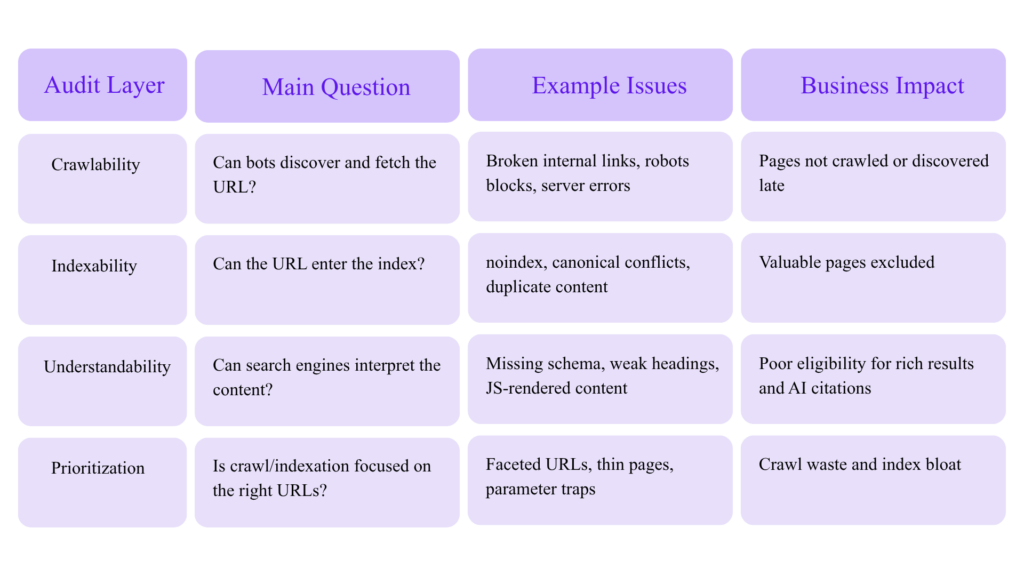
Google’s Crawl Stats report is aimed at advanced users and shows Google’s crawling history, request volume, server responses, and availability issues. Google also notes that if a site has fewer than a thousand pages, most owners do not need that level of crawl detail.
That guidance is important: crawl budget optimization is not equally valuable for every site. It is critical for large, frequently updated, faceted, multilingual, ecommerce, marketplace, news, documentation, and programmatic SEO websites.
Advanced Crawl Budget Optimization: Stop Wasting Googlebot
Google’s crawl budget documentation says crawl budget optimization is mainly relevant for very large and frequently updated sites. For smaller sites, Google says keeping the sitemap updated and checking index coverage regularly is usually enough.
For large websites, however, crawl budget can become a growth bottleneck.
What Crawl Budget Really Means
Crawl budget is not a single number you can directly control. It is the practical result of:
- Googlebot’s ability to crawl your server without harming performance
- Google’s demand to crawl your URLs
- URL discovery signals
- Freshness signals
- Internal link structure
- Sitemap quality
- Duplicate and low-value URL volume
- Server response patterns
- Redirect and error waste
Visual: Crawl Budget Waste Model
100% Googlebot Crawl Activity
│
├── 55% Valuable canonical pages
├── 15% Redirect chains
├── 12% Parameter/faceted duplicates
├── 8% Soft 404 or thin pages
├── 6% Blocked or noindexed URLs
└── 4% Server errors/timeouts
│
├── 55% Valuable canonical pages
├── 15% Redirect chains
├── 12% Parameter/faceted duplicates
├── 8% Soft 404 or thin pages
├── 6% Blocked or noindexed URLs
└── 4% Server errors/timeouts
Goal: Increase the percentage of crawl activity spent on valuable canonical URLs.
Expert Crawl Optimization Checklist
1. Build a URL Inventory
Create a master URL database from:
- XML sitemaps
- CMS exports
- Server logs
- Google Search Console indexed URLs
- Google Search Console discovered/excluded URLs
- Internal crawl data
- Backlink tools
- Analytics landing pages
- Product/category databases
- CDN logs
Then classify every URL:
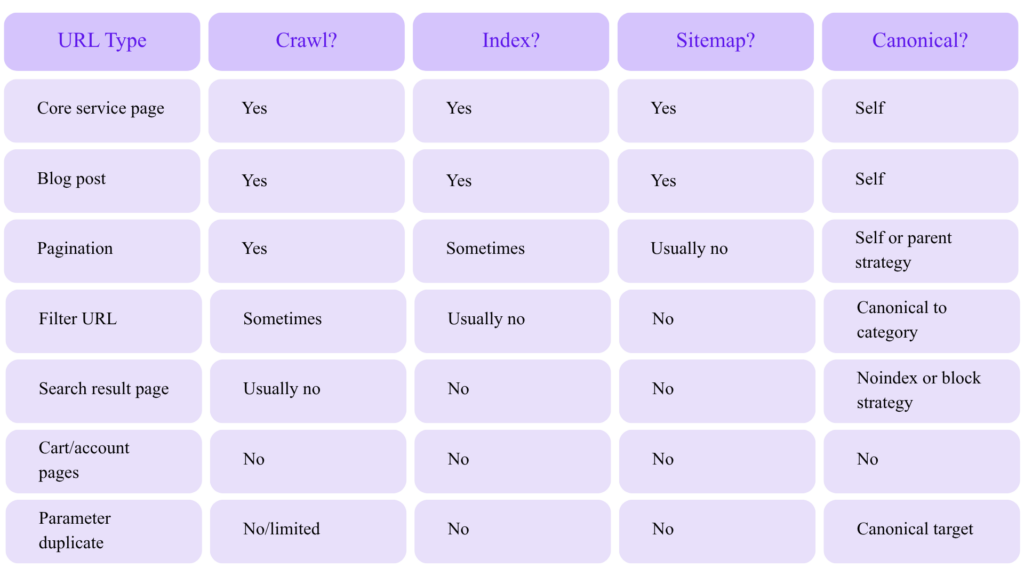
2. Segment XML Sitemaps by Page Type
Google’s sitemap documentation states that a single sitemap is limited to 50MB uncompressed or 50,000 URLs, and larger sites should split URLs into multiple sitemaps and optionally use a sitemap index.
Do not create one giant sitemap if you run a large website. Segment by business logic:
/sitemap-index.xml
├── /sitemap-services.xml
├── /sitemap-blog.xml
├── /sitemap-products.xml
├── /sitemap-categories.xml
├── /sitemap-locations.xml
├── /sitemap-authors.xml
└── /sitemap-news.xml
├── /sitemap-services.xml
├── /sitemap-blog.xml
├── /sitemap-products.xml
├── /sitemap-categories.xml
├── /sitemap-locations.xml
├── /sitemap-authors.xml
└── /sitemap-news.xml
This lets you diagnose indexation patterns faster. For example, if product pages drop from 92% indexed to 61% indexed, you can isolate the problem without mixing them with blog URLs.
3. Keep Only Canonical, Indexable URLs in Sitemaps
An expert sitemap should not include:
- Redirecting URLs
- 404 URLs
- Canonicalized duplicates
noindexpages- Parameter variants
- Internal search URLs
- Staging URLs
- HTTP versions of HTTPS pages
- Mixed trailing slash variants
Sitemaps are not just discovery files. They are quality hints. If your sitemap contains junk, you are telling crawlers that junk matters.
4. Use Robots.txt for Crawl Control, Not Index Control
Google’s robots.txt documentation explains that robots.txt is used to manage crawler traffic, but it is not a security mechanism and not all crawlers obey it.
A common expert-level mistake is using robots.txt to handle duplicate content. Google’s canonicalization documentation specifically says not to use robots.txt for canonicalization because Google may still index URLs disallowed in robots.txt without seeing their content.
Use robots.txt for:
Disallow: /cart/
Disallow: /checkout/
Disallow: /internal-search/
Disallow: /*?sort=
Disallow: /*?sessionid=
Disallow: /checkout/
Disallow: /internal-search/
Disallow: /*?sort=
Disallow: /*?sessionid=
Do not rely on robots.txt for:
Duplicate content consolidation
Removing URLs from Google
Preventing private files from being accessed
Canonical selection
Noindexing pages
Removing URLs from Google
Preventing private files from being accessed
Canonical selection
Noindexing pages
Also remember that Google enforces a 500 KiB robots.txt file size limit, and content after that limit is ignored.
5. Fix Crawl Traps Before They Become Index Bloat
Common crawl traps include:
- Faceted navigation combinations
- Infinite calendar URLs
- Internal search result pages
- Sort/filter parameters
- Session IDs
- Tracking parameters
- Print pages
- Duplicate location pages
- Auto-generated tag archives
- Low-quality AI-generated pages
- Pagination loops
- JavaScript-generated links with endless states
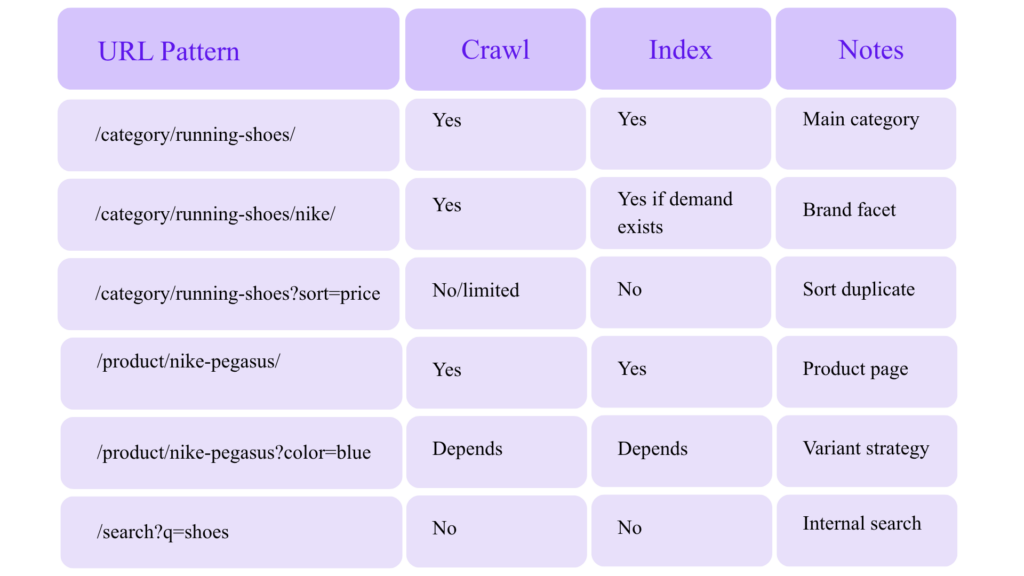
For ecommerce and marketplace sites, faceted navigation can create millions of URL combinations. Your job is to decide which combinations deserve crawl and indexation.
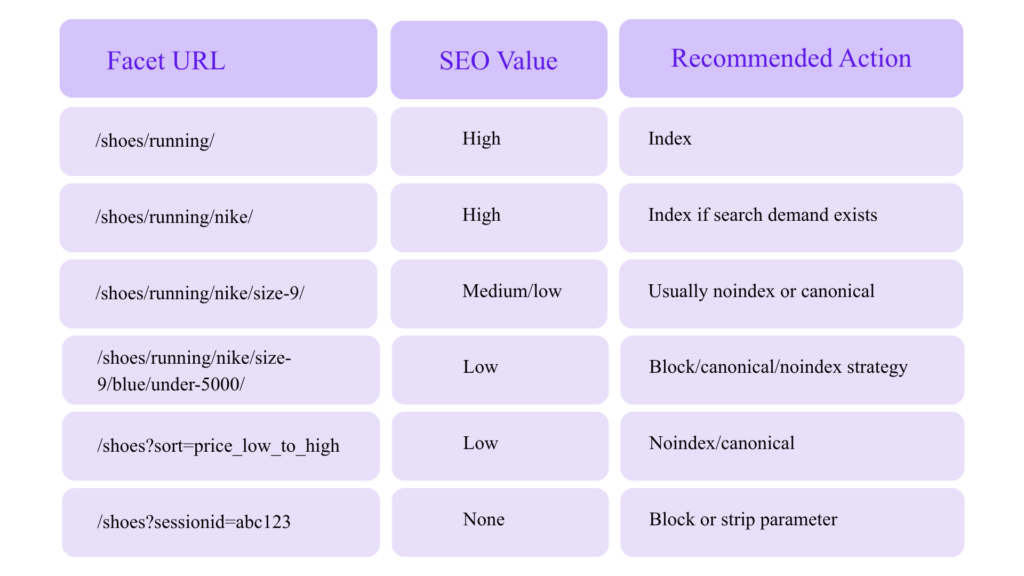
Canonicalization: Treat It as Architecture, Not a Tag
Google defines canonicalization as the process of selecting the representative URL from a set of duplicate pages.
Advanced canonicalization requires consistency across multiple signals:
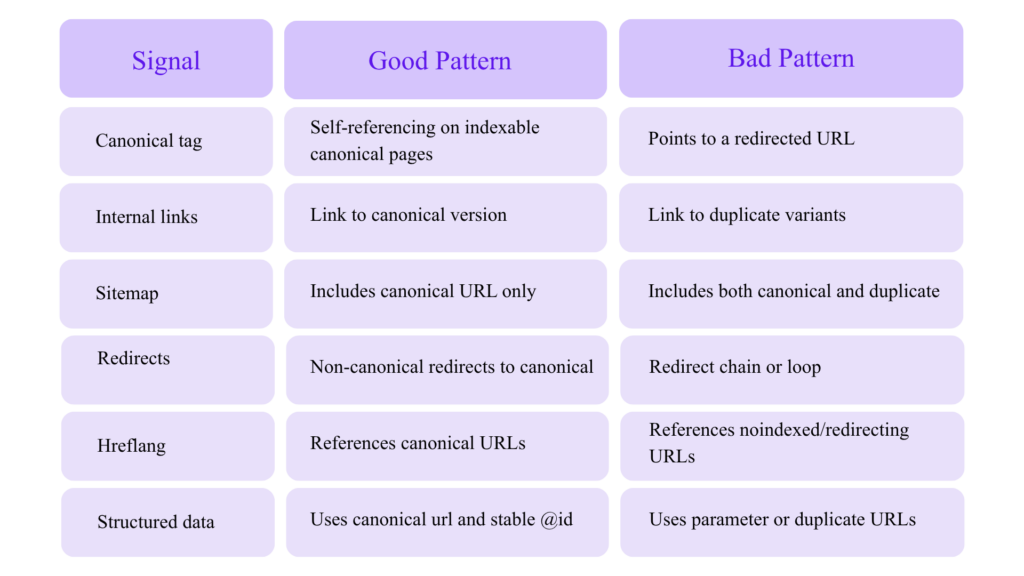
Canonical Conflict Example
Bad:
<link rel=“canonical” href=“https://example.com/product/” />
But internal links point to:
https://example.com/product?color=blue
https://example.com/product/?utm_source=email
https://www.example.com/product/
http://example.com/product/
https://example.com/product/?utm_source=email
https://www.example.com/product/
http://example.com/product/
Better:
All internal links → https://example.com/product/
Sitemap URL → https://example.com/product/
Canonical tag → https://example.com/product/
Structured data url → https://example.com/product/
Redirect variants → https://example.com/product/
Sitemap URL → https://example.com/product/
Canonical tag → https://example.com/product/
Structured data url → https://example.com/product/
Redirect variants → https://example.com/product/
Canonical tags are hints, not commands. If your signals conflict, Google may choose a different canonical.
Structured Data for Experts: Build Schema Graphs, Not Snippets
Google says structured data helps it understand page content and can make pages eligible for rich results. It also states that supported formats include JSON-LD, Microdata, and RDFa, with JSON-LD recommended.
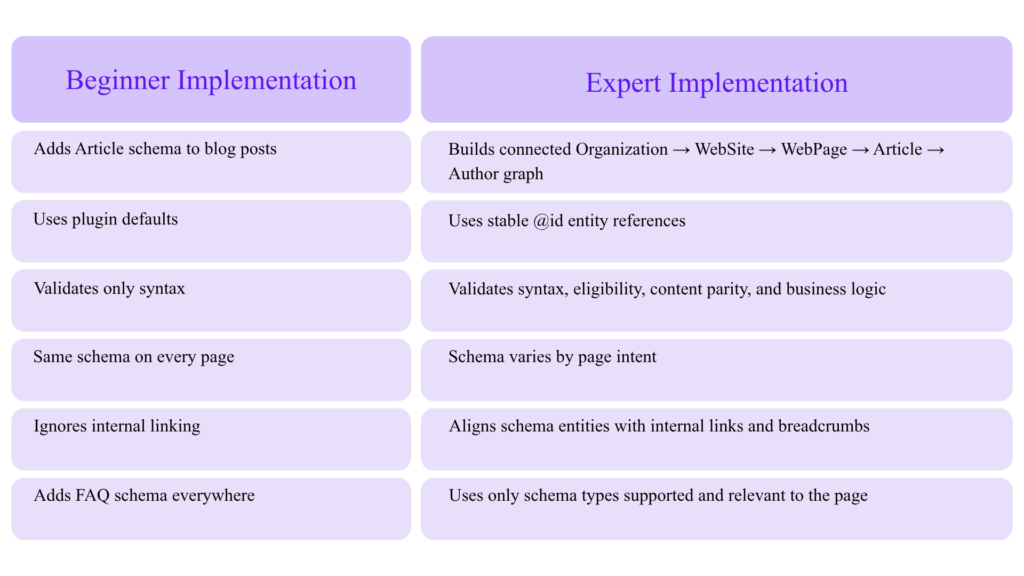
For advanced SEO, schema should not be treated as a plugin checkbox. It should be a sitewide entity system.
Beginner Schema vs Expert Schema
The Entity Graph Approach
Use stable @id values to connect entities across the website.
Example:
{
“@context”: “https://schema.org”,
“@graph”: [
{
“@type”: “Organization”,
“@id”: “https://www.example.com/#organization”,
“name”: “Example SEO Agency”,
“url”: “https://www.example.com/”,
“logo”: {
“@type”: “ImageObject”,
“@id”: “https://www.example.com/#logo”,
“url”: “https://www.example.com/logo.png”
},
“sameAs”: [
“https://www.linkedin.com/company/example”,
“https://twitter.com/example”
]
},
{
“@type”: “WebSite”,
“@id”: “https://www.example.com/#website”,
“url”: “https://www.example.com/”,
“name”: “Example SEO Agency”,
“publisher”: {
“@id”: “https://www.example.com/#organization”
}
},
{
“@type”: “WebPage”,
“@id”: “https://www.example.com/advanced-technical-seo-tips/#webpage”,
“url”: “https://www.example.com/advanced-technical-seo-tips/”,
“name”: “Advanced Technical SEO Tips for Experts”,
“isPartOf”: {
“@id”: “https://www.example.com/#website”
},
“about”: {
“@id”: “https://www.example.com/#organization”
}
}
]
}
“@context”: “https://schema.org”,
“@graph”: [
{
“@type”: “Organization”,
“@id”: “https://www.example.com/#organization”,
“name”: “Example SEO Agency”,
“url”: “https://www.example.com/”,
“logo”: {
“@type”: “ImageObject”,
“@id”: “https://www.example.com/#logo”,
“url”: “https://www.example.com/logo.png”
},
“sameAs”: [
“https://www.linkedin.com/company/example”,
“https://twitter.com/example”
]
},
{
“@type”: “WebSite”,
“@id”: “https://www.example.com/#website”,
“url”: “https://www.example.com/”,
“name”: “Example SEO Agency”,
“publisher”: {
“@id”: “https://www.example.com/#organization”
}
},
{
“@type”: “WebPage”,
“@id”: “https://www.example.com/advanced-technical-seo-tips/#webpage”,
“url”: “https://www.example.com/advanced-technical-seo-tips/”,
“name”: “Advanced Technical SEO Tips for Experts”,
“isPartOf”: {
“@id”: “https://www.example.com/#website”
},
“about”: {
“@id”: “https://www.example.com/#organization”
}
}
]
}
This does three things:
- Defines your business as an entity.
- Defines your website as a property of that entity.
- Connects each page back to the same entity system.
That is much stronger than disconnected schema blocks.
Recommended Schema Types by Page Type
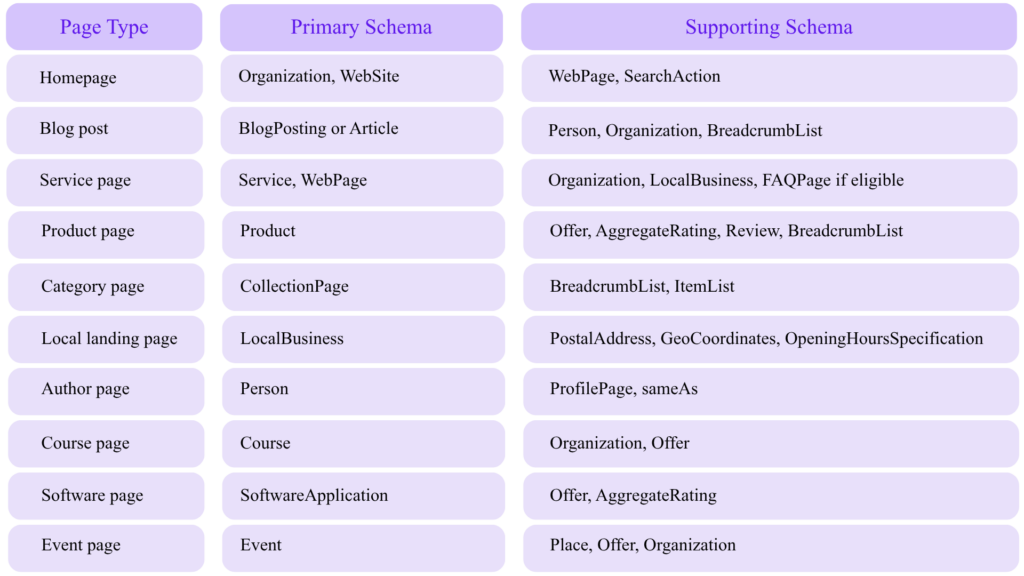
Google maintains a structured data gallery for markup types that can produce supported Google Search rich results.
Schema Quality: Match Markup to Visible Content
Google’s structured data guidelines include technical and quality requirements. The page must not block structured data pages from Googlebot, and structured data should follow the relevant content policies and feature guidelines.
The expert rule:
“If users cannot see it, do not mark it up as if it is a primary page fact.”
Bad schema patterns:
- Marking fake reviews
- Adding FAQ schema for content not visible on the page
- Marking every page as
Product - Using organization schema with inconsistent business names
- Adding author schema for non-existent experts
- Marking blog articles as news articles without being a news publisher
- Using aggregate ratings not shown to users
- Creating AI-generated schema that does not match visible content
Structured Data Examples for Expert SEO
BlogPosting Schema Example
{
“@context”: “https://schema.org”,
“@type”: “BlogPosting”,
“@id”: “https://www.example.com/advanced-technical-seo-tips/#blogposting”,
“headline”: “Advanced Technical SEO Tips for Experts”,
“description”: “A guide to structured data, schema markup, crawl optimization, and AI-powered technical SEO auditing.”,
“image”: “https://www.example.com/images/advanced-technical-seo.jpg”,
“datePublished”: “2026-04-25”,
“dateModified”: “2026-04-25”,
“author”: {
“@type”: “Person”,
“@id”: “https://www.example.com/authors/pavan-kumar/#person”,
“name”: “Pavan Kumar”,
“url”: “https://www.example.com/authors/pavan-kumar/”
},
“publisher”: {
“@type”: “Organization”,
“@id”: “https://www.example.com/#organization”,
“name”: “Example SEO Agency”,
“logo”: {
“@type”: “ImageObject”,
“url”: “https://www.example.com/logo.png”
}
},
“mainEntityOfPage”: {
“@type”: “WebPage”,
“@id”: “https://www.example.com/advanced-technical-seo-tips/#webpage”
}
}
“@context”: “https://schema.org”,
“@type”: “BlogPosting”,
“@id”: “https://www.example.com/advanced-technical-seo-tips/#blogposting”,
“headline”: “Advanced Technical SEO Tips for Experts”,
“description”: “A guide to structured data, schema markup, crawl optimization, and AI-powered technical SEO auditing.”,
“image”: “https://www.example.com/images/advanced-technical-seo.jpg”,
“datePublished”: “2026-04-25”,
“dateModified”: “2026-04-25”,
“author”: {
“@type”: “Person”,
“@id”: “https://www.example.com/authors/pavan-kumar/#person”,
“name”: “Pavan Kumar”,
“url”: “https://www.example.com/authors/pavan-kumar/”
},
“publisher”: {
“@type”: “Organization”,
“@id”: “https://www.example.com/#organization”,
“name”: “Example SEO Agency”,
“logo”: {
“@type”: “ImageObject”,
“url”: “https://www.example.com/logo.png”
}
},
“mainEntityOfPage”: {
“@type”: “WebPage”,
“@id”: “https://www.example.com/advanced-technical-seo-tips/#webpage”
}
}
BreadcrumbList Schema Example
{
“@context”: “https://schema.org”,
“@type”: “BreadcrumbList”,
“@id”: “https://www.example.com/advanced-technical-seo-tips/#breadcrumb”,
“itemListElement”: [
{
“@type”: “ListItem”,
“position”: 1,
“name”: “Home”,
“item”: “https://www.example.com/”
},
{
“@type”: “ListItem”,
“position”: 2,
“name”: “SEO Blog”,
“item”: “https://www.example.com/blog/”
},
{
“@type”: “ListItem”,
“position”: 3,
“name”: “Advanced Technical SEO Tips”,
“item”: “https://www.example.com/advanced-technical-seo-tips/”
}
]
}
“@context”: “https://schema.org”,
“@type”: “BreadcrumbList”,
“@id”: “https://www.example.com/advanced-technical-seo-tips/#breadcrumb”,
“itemListElement”: [
{
“@type”: “ListItem”,
“position”: 1,
“name”: “Home”,
“item”: “https://www.example.com/”
},
{
“@type”: “ListItem”,
“position”: 2,
“name”: “SEO Blog”,
“item”: “https://www.example.com/blog/”
},
{
“@type”: “ListItem”,
“position”: 3,
“name”: “Advanced Technical SEO Tips”,
“item”: “https://www.example.com/advanced-technical-seo-tips/”
}
]
}
Service Schema Example for an SEO Agency
{
“@context”: “https://schema.org”,
“@type”: “Service”,
“@id”: “https://www.example.com/technical-seo-services/#service”,
“name”: “Technical SEO Audit Services”,
“serviceType”: “Technical SEO Audit”,
“provider”: {
“@type”: “Organization”,
“@id”: “https://www.example.com/#organization”,
“name”: “Example SEO Agency”
},
“areaServed”: {
“@type”: “Country”,
“name”: “India”
},
“description”: “Advanced technical SEO audits covering crawl optimization, indexation, schema markup, Core Web Vitals, JavaScript SEO, and AI search readiness.”,
“url”: “https://www.example.com/technical-seo-services/”
}
“@context”: “https://schema.org”,
“@type”: “Service”,
“@id”: “https://www.example.com/technical-seo-services/#service”,
“name”: “Technical SEO Audit Services”,
“serviceType”: “Technical SEO Audit”,
“provider”: {
“@type”: “Organization”,
“@id”: “https://www.example.com/#organization”,
“name”: “Example SEO Agency”
},
“areaServed”: {
“@type”: “Country”,
“name”: “India”
},
“description”: “Advanced technical SEO audits covering crawl optimization, indexation, schema markup, Core Web Vitals, JavaScript SEO, and AI search readiness.”,
“url”: “https://www.example.com/technical-seo-services/”
}
AI Search Optimization and Technical SEO
Google’s “AI features and your website” documentation covers how AI features such as AI Overviews and AI Mode work from a site owner’s perspective.
This does not mean there is a separate magic formula for “AI SEO.” The strongest technical foundations still apply:
- Crawlable HTML
- Clear page purpose
- Strong internal links
- Structured data
- Entity consistency
- Helpful content
- Author/source clarity
- Freshness signals
- Fast page experience
- Trustworthy citations and references
How Technical SEO Supports AI Visibility
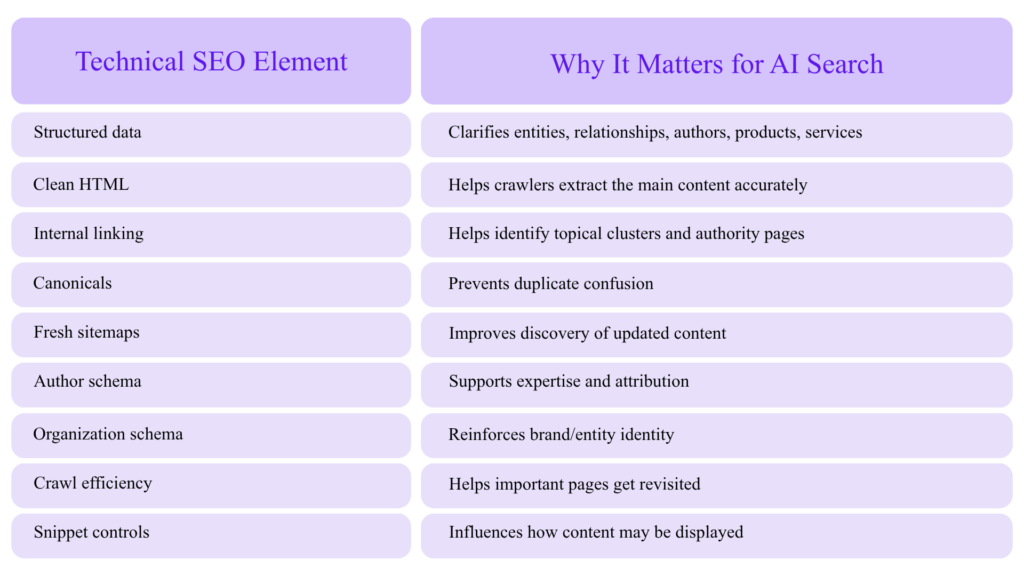
Google’s robots meta tag documentation explains page-level and text-level controls such as robots meta tags, X-Robots-Tag, and data-nosnippet for controlling how content appears in search results.
For AI search, this matters because snippet controls can affect how much content is available for display in search features.
AI-Generated Content: Use AI as an Assistant, Not a Page Factory
Google’s guidance on generative AI content says AI can be useful for research and adding structure to original content, but using generative AI to create many pages without adding value may violate Google’s scaled content abuse policies.
For technical SEO teams, that means AI should be used for:
- Crawl data classification
- Schema drafts
- Internal linking suggestions
- Duplicate intent grouping
- Log file anomaly detection
- Metadata pattern detection
- Content gap clustering
- Redirect mapping
- SERP intent extraction
- QA automation
AI should not be used to mass-publish thin, unreviewed, near-duplicate pages.
AI Tools for Technical SEO Auditing
AI is most useful when layered on top of reliable crawl, log, and Search Console data.
Tool Stack for Advanced AI SEO Audits
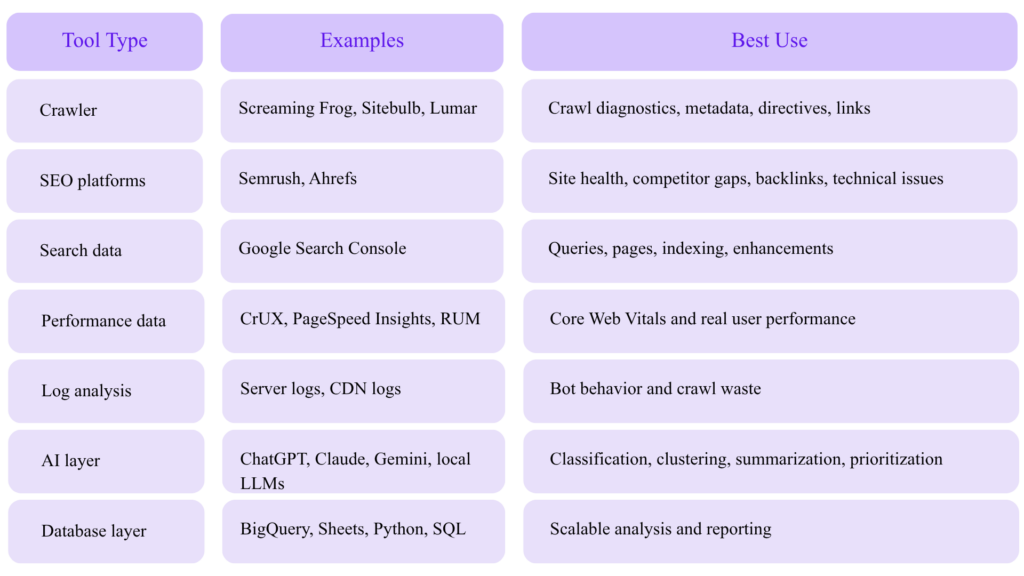
Screaming Frog documents AI API integrations for crawling with prompts, including use cases like generating image alt text, analyzing language/sentiment/intent, scraping data, and extracting embeddings from page content.
Screaming Frog also validates structured data against Schema.org vocabulary and Google rich result features, using Google’s documentation and guidelines for required and recommended properties.
Ahrefs states that its Site Audit can scan for 170+ technical and on-page SEO issues, while Semrush’s SEO Checker describes scanning meta tags, headings, keywords, backlinks, page speed, mobile friendliness, Core Web Vitals, and more.
Practical AI Audit Prompts for Technical SEO Experts
Use AI prompts against crawl exports, but constrain the model with rules.
Prompt 1: Identify Indexation Waste
You are a senior technical SEO auditor.
Analyze this URL export. Classify each URL into one of these categories:
1. Indexable strategic page
2. Duplicate or canonicalized page
3. Thin/low-value page
4. Parameter or faceted URL
5. Redirect/error URL
6. Noindex page
7. Needs manual review
Return columns:
URL, category, evidence, recommended action, priority.
Rules:
– Do not assume a page is low value only because the title is short.
– Flag conflicts where sitemap inclusion does not match indexability.
– Prioritize URLs that are internally linked, in sitemap, and non-indexable.
Analyze this URL export. Classify each URL into one of these categories:
1. Indexable strategic page
2. Duplicate or canonicalized page
3. Thin/low-value page
4. Parameter or faceted URL
5. Redirect/error URL
6. Noindex page
7. Needs manual review
Return columns:
URL, category, evidence, recommended action, priority.
Rules:
– Do not assume a page is low value only because the title is short.
– Flag conflicts where sitemap inclusion does not match indexability.
– Prioritize URLs that are internally linked, in sitemap, and non-indexable.
Prompt 2: Detect Schema/Page Mismatch
You are auditing structured data for Google rich result eligibility.
Compare the visible page content with the JSON-LD schema.
Flag:
– Schema entities not visible on the page
– Missing required or recommended fields
– Incorrect @type
– Inconsistent author, organization, URL, date, or breadcrumb data
– Review/rating markup that is not visible to users
– Duplicate @id values
– Non-canonical URLs in schema
Return:
Issue, affected property, evidence, severity, fix.
Compare the visible page content with the JSON-LD schema.
Flag:
– Schema entities not visible on the page
– Missing required or recommended fields
– Incorrect @type
– Inconsistent author, organization, URL, date, or breadcrumb data
– Review/rating markup that is not visible to users
– Duplicate @id values
– Non-canonical URLs in schema
Return:
Issue, affected property, evidence, severity, fix.
Prompt 3: Cluster URLs by Search Intent
You are an SEO information architecture specialist.
Cluster these URLs by search intent and topical similarity.
Identify:
– Cannibalization risks
– Pages that should be consolidated
– Pages that need stronger internal links
– Pages that should become hub pages
– Pages that should be noindexed or removed
Return:
Cluster name, URLs, primary intent, recommended canonical/hub URL, action.
Cluster these URLs by search intent and topical similarity.
Identify:
– Cannibalization risks
– Pages that should be consolidated
– Pages that need stronger internal links
– Pages that should become hub pages
– Pages that should be noindexed or removed
Return:
Cluster name, URLs, primary intent, recommended canonical/hub URL, action.
Prompt 4: Log File Bot Waste Analysis
You are analyzing Googlebot server logs.
Classify crawl requests into:
– Valuable canonical pages
– Redirects
– 404/410 errors
– Parameter URLs
– Faceted URLs
– Static resources
– Noindex pages
– Blocked pages
– Duplicate paths
Calculate:
– % crawl waste
– top waste patterns
– highest-impact robots/canonical/internal link fixes
– pages crawled often but not indexed
– important pages not crawled recently
Classify crawl requests into:
– Valuable canonical pages
– Redirects
– 404/410 errors
– Parameter URLs
– Faceted URLs
– Static resources
– Noindex pages
– Blocked pages
– Duplicate paths
Calculate:
– % crawl waste
– top waste patterns
– highest-impact robots/canonical/internal link fixes
– pages crawled often but not indexed
– important pages not crawled recently
We created a checklist that helps you dominate Google and LLMs in 2026. The checklist has practical SEO tips that the top SEOs use daily. Get it for FREE.
JavaScript SEO: Make the Rendered Page Match the SEO Page
Google’s JavaScript SEO documentation explains that Google processes JavaScript web apps in three main phases: crawling, rendering, and indexing.
For expert SEOs, the issue is not whether Google can render JavaScript. The issue is whether rendering introduces delay, inconsistency, missing links, missing metadata, hydration problems, or content mismatch.
JavaScript SEO Audit Checklist
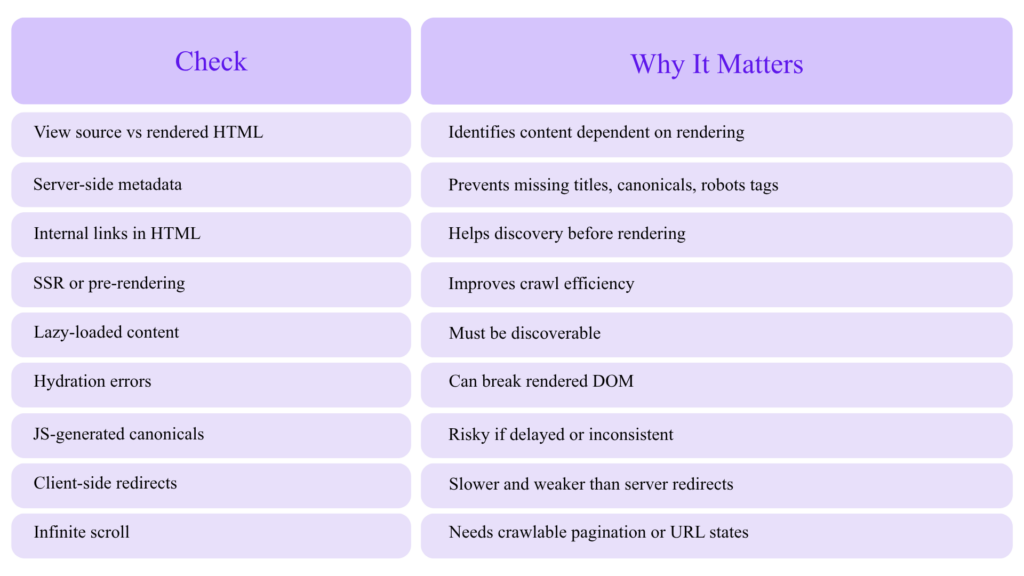
Google’s lazy-loading guidance warns that if lazy loading is not implemented correctly, content can be hidden from Google.
Expert Recommendation
For SEO-critical pages, ensure the following are present in the initial HTML whenever possible:
- Title tag
- Meta description
- Canonical tag
- Robots meta tag
- Hreflang
- Main H1
- Primary body content
- Internal links
- Breadcrumbs
- Product/service details
- Structured data
- Pagination links
Core Web Vitals for Technical SEO Experts
Google says Core Web Vitals are used by its ranking systems and recommends achieving good Core Web Vitals for Search and user experience, while also noting that good scores do not guarantee top rankings.
The current Core Web Vitals thresholds are:
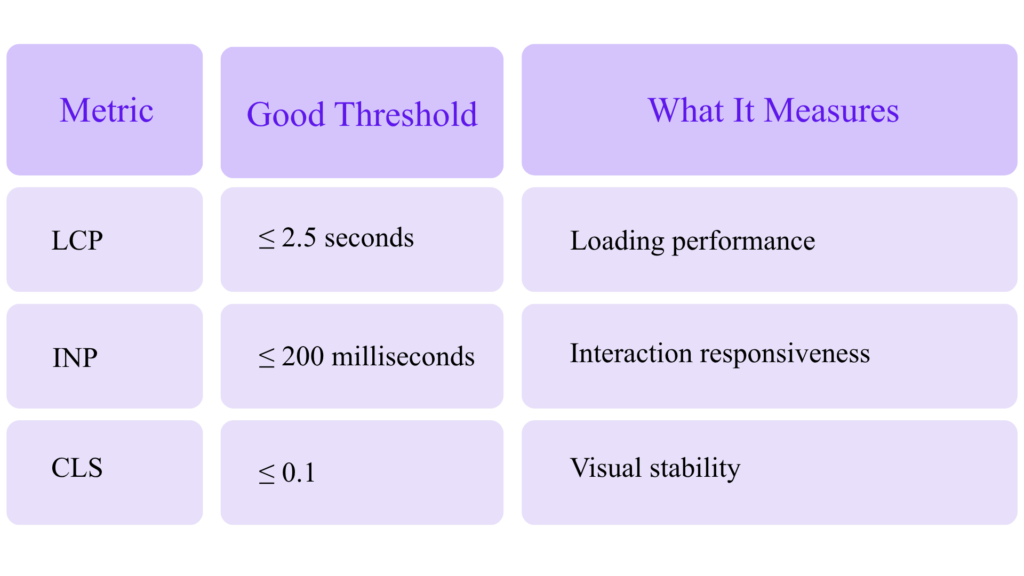
These thresholds are documented by web.dev.
Core Web Vitals Target Dashboard
Core Web Vitals Expert Targets
LCP ≤ 2.5s ██████████ Good
INP ≤ 200ms ██████████ Good
CLS ≤ 0.1 ██████████ Good
Advanced LCP Fixes
Prioritize:
- Server response time
- HTML streaming
- Critical CSS
- Image preload
- Hero image optimization
- CDN caching
- Reducing render-blocking scripts
- Avoiding lazy loading for the LCP image
- Font loading strategy
- Removing unnecessary client-side rendering
Advanced INP Fixes
Prioritize:
- Reducing long JavaScript tasks
- Splitting bundles
- Deferring non-critical JS
- Reducing third-party scripts
- Optimizing event handlers
- Using web workers
- Reducing hydration cost
- Monitoring real user interaction data
Advanced CLS Fixes
Prioritize:
- Explicit image/video dimensions
- Reserved ad slots
- Stable font loading
- Avoiding injected banners above content
- Predictable cookie notices
- Avoiding late-loading UI components
The Chrome UX Report data is available in BigQuery going back to 2017, which makes it useful for trend analysis, technology benchmarking, and domain comparisons.
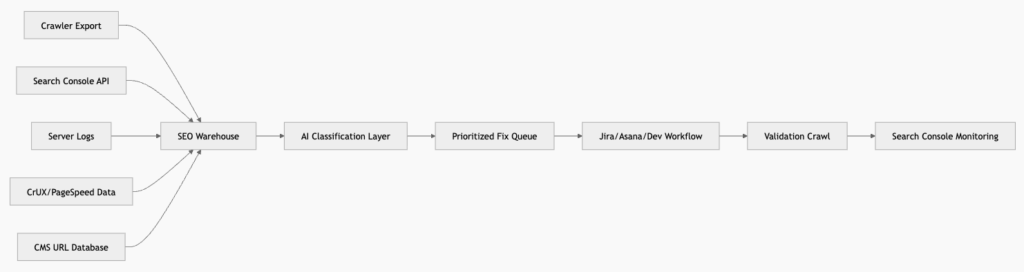
Search Console, APIs, and Automation for Expert SEO
The URL Inspection API can provide indexed or indexable status for a URL, but Google notes that it currently shows only the version in Google’s index and cannot test live URL indexability.
This is important because automation should not blindly treat API data as live validation.
Recommended Expert SEO Data Pipeline
Useful Automated Alerts
Set alerts for:
- Sudden increase in 5xx responses
- Sitemap URLs returning non-200 status
- Indexable pages with canonical conflicts
- Important pages losing impressions
- Spike in “Discovered – currently not indexed”
- Drop in Googlebot crawl activity on money pages
- Increase in parameter URL crawling
- Schema validation errors after deployment
- Core Web Vitals template regressions
- Robots.txt changes
- Accidental
noindex - Canonical tags pointing to staging or wrong domain
IndexNow and Faster Discovery Beyond Google
IndexNow is an open protocol that lets sites notify participating search engines when URLs are added, updated, or deleted.
Bing recommends IndexNow for faster automated URL submission across participating search engines.
For technical SEO experts, IndexNow is useful for:
- News sites
- Ecommerce inventory updates
- Job listings
- Real estate listings
- Programmatic landing pages
- Documentation updates
- Large content libraries
- Price and availability changes
Do not treat IndexNow as a replacement for strong internal linking, sitemaps, crawlable architecture, or content quality. It is a discovery acceleration layer.
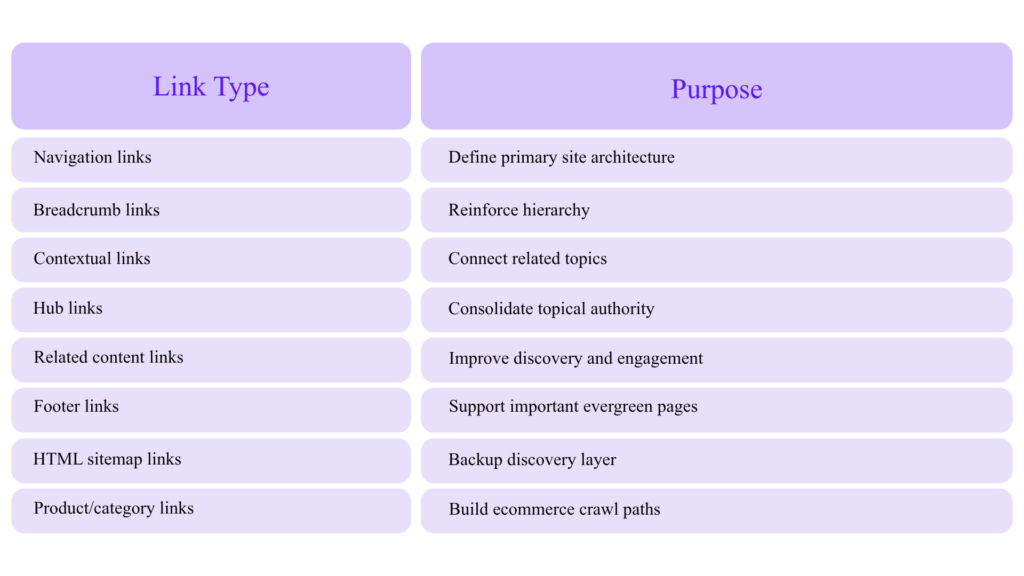
Advanced Internal Linking: Build Crawl Paths and Entity Paths
Internal linking is not just PageRank distribution. It is also a crawl path, topical signal, and entity relationship map.
Expert Internal Linking Model
AI-Assisted Internal Link Audit
Use embeddings or LLM classification to find pages that are semantically related but not internally linked. Screaming Frog documents extracting embeddings from page content as one of the use cases for AI-integrated crawling.
Workflow:
- Crawl all indexable pages.
- Extract titles, H1s, body text, canonical URLs.
- Generate embeddings.
- Cluster by topical similarity.
- Compare clusters against actual internal links.
- Find missing contextual links.
- Prioritize pages with impressions but low CTR or average position 4–15.
- Add links from high-authority relevant pages.
- Re-crawl and monitor.
Technical SEO for AI Agents and LLM Crawlers
AI search does not eliminate technical SEO. It increases the value of clarity.
To make content easier for AI systems to interpret:
- Use descriptive headings.
- Put direct answers near the top.
- Include original data and examples.
- Cite trustworthy sources.
- Add author and organization information.
- Keep schema accurate.
- Avoid hiding primary content behind tabs that require interaction.
- Use clean HTML.
- Make pages fast and accessible.
- Keep content updated.
- Use canonical URLs consistently.
- Avoid duplicate or near-duplicate programmatic pages.
AI-Readable Content Structure
Page Title
├── Direct Answer / Summary
├── Definitions
├── Step-by-Step Process
├── Examples
├── Data / Tables
├── Expert Commentary
├── FAQs
├── Sources
└── Author / Company Information
├── Direct Answer / Summary
├── Definitions
├── Step-by-Step Process
├── Examples
├── Data / Tables
├── Expert Commentary
├── FAQs
├── Sources
└── Author / Company Information
This structure helps both users and machines.
Advanced Robots Meta and Snippet Controls
Google’s robots meta tag documentation covers meta robots, X-Robots-Tag, and data-nosnippet as mechanisms to control indexing and content presentation.
Common directives:
<meta name=“robots” content=“noindex, follow”>
<meta name=“robots” content=“max-snippet:120”>
<meta name=“robots” content=“max-image-preview:large”>
<meta name=“robots” content=“max-video-preview:30”>
<meta name=“robots” content=“max-snippet:120”>
<meta name=“robots” content=“max-image-preview:large”>
<meta name=“robots” content=“max-video-preview:30”>
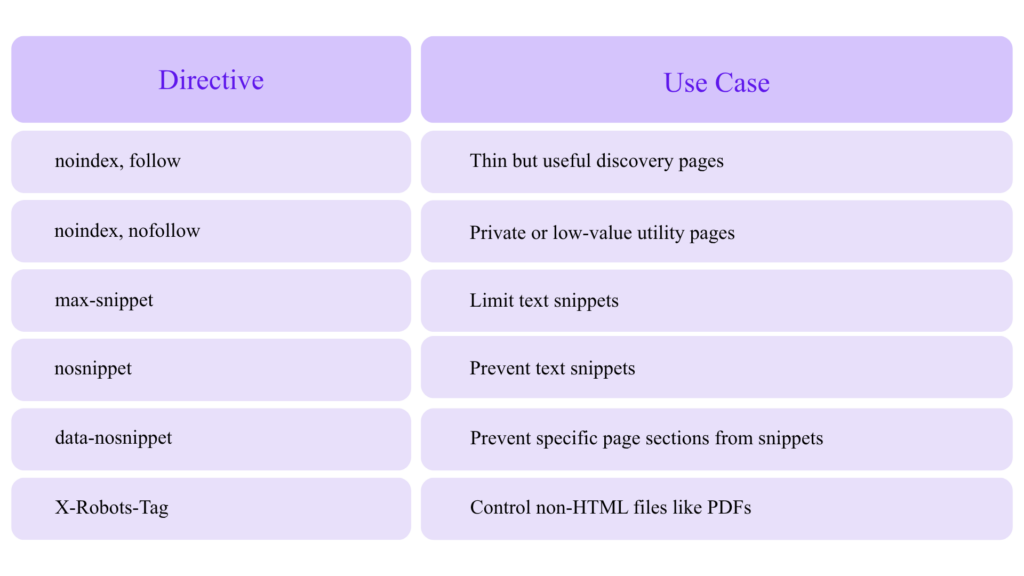
Be careful: restricting snippets too aggressively may reduce search result attractiveness and affect how your content appears in AI-influenced search experiences.
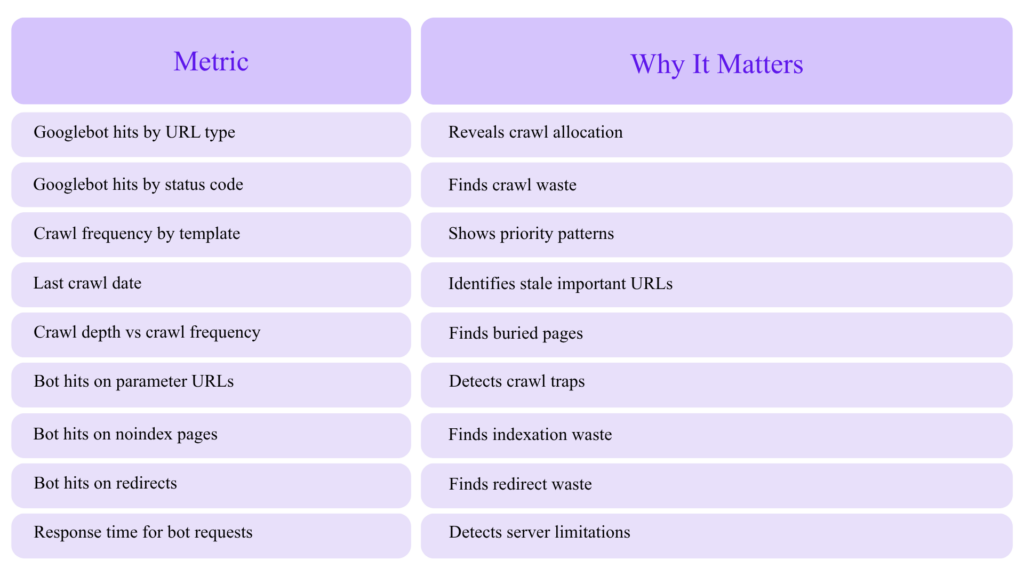
Log File Analysis: The Expert’s Crawl Truth Source
Crawlers show what can be crawled. Logs show what was crawled.
Log File Metrics to Track
Crawl Waste Formula
Crawl Waste % =
(Redirect hits + 4xx hits + 5xx hits + parameter hits + non-indexable hits)
÷ Total Googlebot hits
× 100
(Redirect hits + 4xx hits + 5xx hits + parameter hits + non-indexable hits)
÷ Total Googlebot hits
× 100
Example:
Total Googlebot hits: 1,000,000
Waste hits: 320,000
Crawl waste: 32%
Waste hits: 320,000
Crawl waste: 32%
A 32% crawl waste rate on a large ecommerce site is a serious technical SEO opportunity.
Advanced Hreflang and International SEO
For multilingual or multi-region sites, technical SEO complexity increases.
Audit:
- Return tags
- Self-referencing hreflang
- Canonical/hreflang alignment
- Language-region format
- HTTP status
- Indexability
- Sitemap hreflang
- Cross-domain consistency
- Translated content quality
- Currency and location targeting
- Duplicate language variants
Bad pattern:
<link rel=“canonical” href=“https://example.com/en/” />
<link rel=“alternate” hreflang=“fr” href=“https://example.com/fr/” />
<link rel=“alternate” hreflang=“fr” href=“https://example.com/fr/” />
But /fr/ canonicalizes to /en/.
This creates a conflict. If a page is meant to rank in French, it should normally canonicalize to itself and reference its alternates correctly.
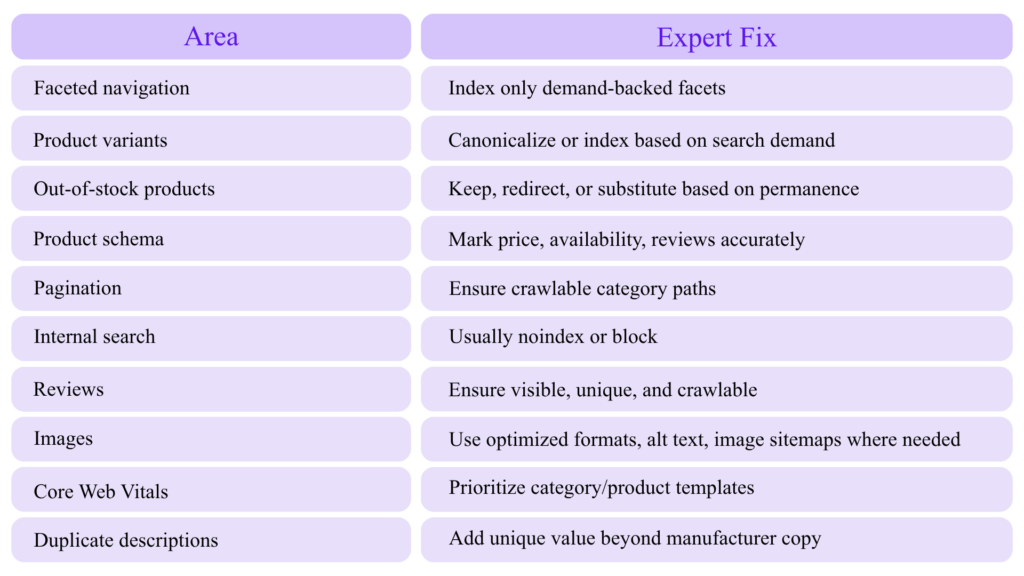
Advanced Technical SEO for Ecommerce
Ecommerce SEO is where technical mistakes compound fastest.
Priority Areas
Ecommerce Crawl Policy Matrix
Advanced Technical SEO for SaaS and B2B Websites
For SaaS and B2B companies, technical SEO should support topical authority and conversion paths.
High-Impact Technical SEO Assets
- Feature pages
- Use case pages
- Integration pages
- Comparison pages
- Alternative pages
- Industry pages
- Documentation
- API docs
- Templates
- Tools/calculators
- Glossaries
- Case studies
- Author pages
- Demo/contact conversion pages
Common SaaS Technical Issues
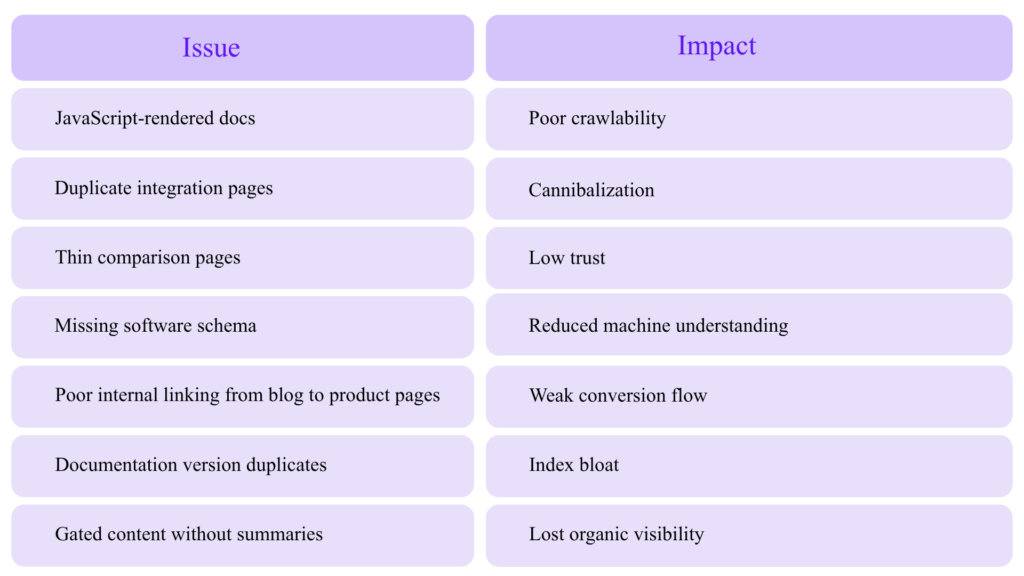
Advanced Technical SEO for Local and Multi-Location Sites
For local SEO, technical consistency is everything.
Audit:
- Location page indexability
- Unique local content
- LocalBusiness schema
- NAP consistency
- Embedded maps
- Reviews
- Service area logic
- Internal links from service pages to location pages
- Duplicate city pages
- Thin doorway pages
- Local images
- Breadcrumbs
- Google Business Profile alignment
Avoid mass-generating city pages with only the city name changed. That is a classic doorway/thin content risk.
Technical SEO Deployment QA Checklist
Before every release, validate:
[ ] No accidental noindex
[ ] Canonicals correct
[ ] Robots.txt unchanged or reviewed
[ ] XML sitemaps valid
[ ] Important templates return 200
[ ] Redirects tested
[ ] Structured data valid
[ ] Breadcrumbs valid
[ ] Internal links crawlable
[ ] Hreflang valid
[ ] Core Web Vitals not regressed
[ ] JS rendering tested
[ ] Mobile rendering tested
[ ] Pagination tested
[ ] Facets tested
[ ] Staging URLs not exposed
[ ] Analytics and Search Console annotations added
[ ] Canonicals correct
[ ] Robots.txt unchanged or reviewed
[ ] XML sitemaps valid
[ ] Important templates return 200
[ ] Redirects tested
[ ] Structured data valid
[ ] Breadcrumbs valid
[ ] Internal links crawlable
[ ] Hreflang valid
[ ] Core Web Vitals not regressed
[ ] JS rendering tested
[ ] Mobile rendering tested
[ ] Pagination tested
[ ] Facets tested
[ ] Staging URLs not exposed
[ ] Analytics and Search Console annotations added
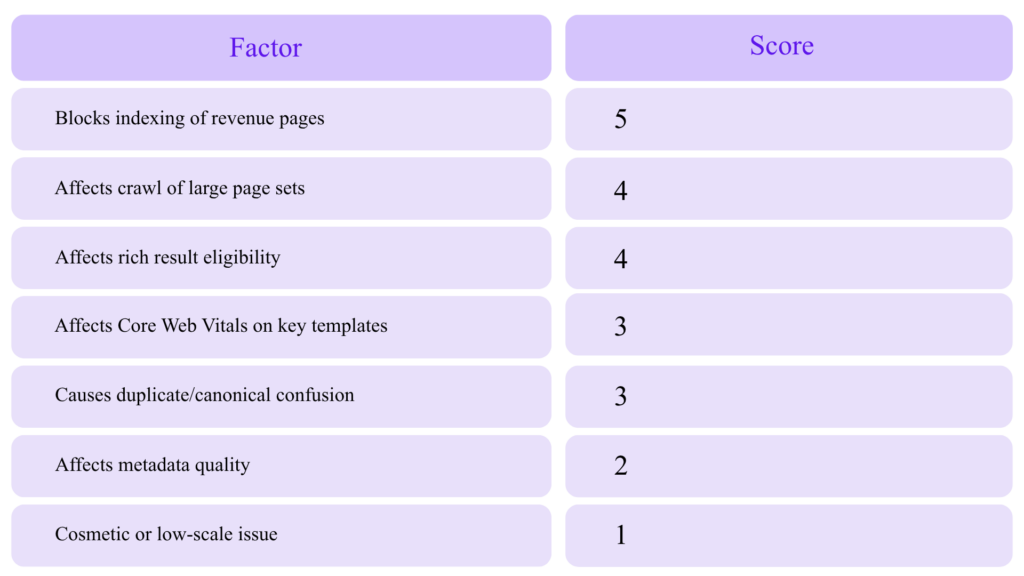
Expert Technical SEO Prioritization Framework
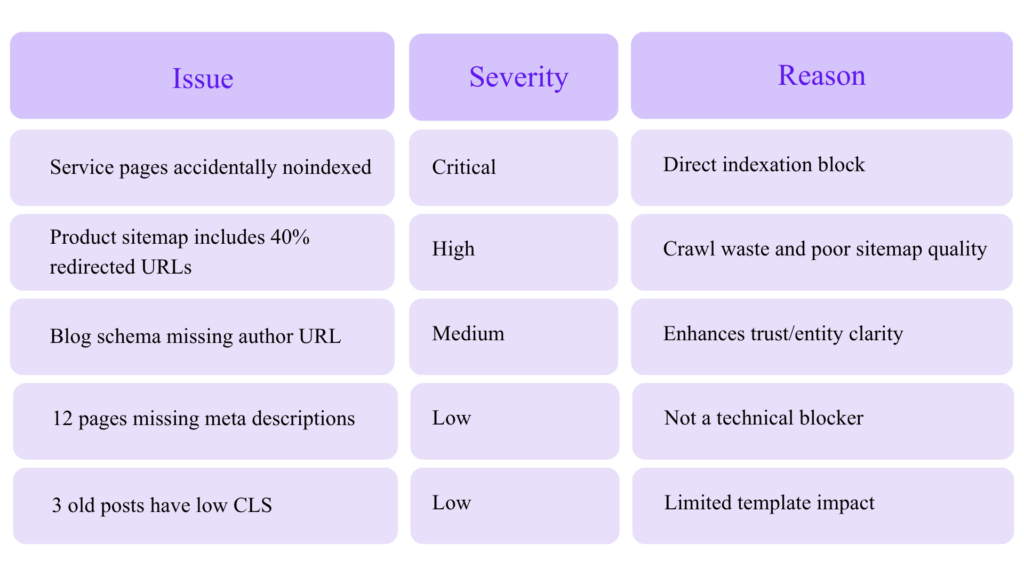
Not every issue deserves developer time. Prioritize by impact.
Impact Scoring Model
Example Prioritization
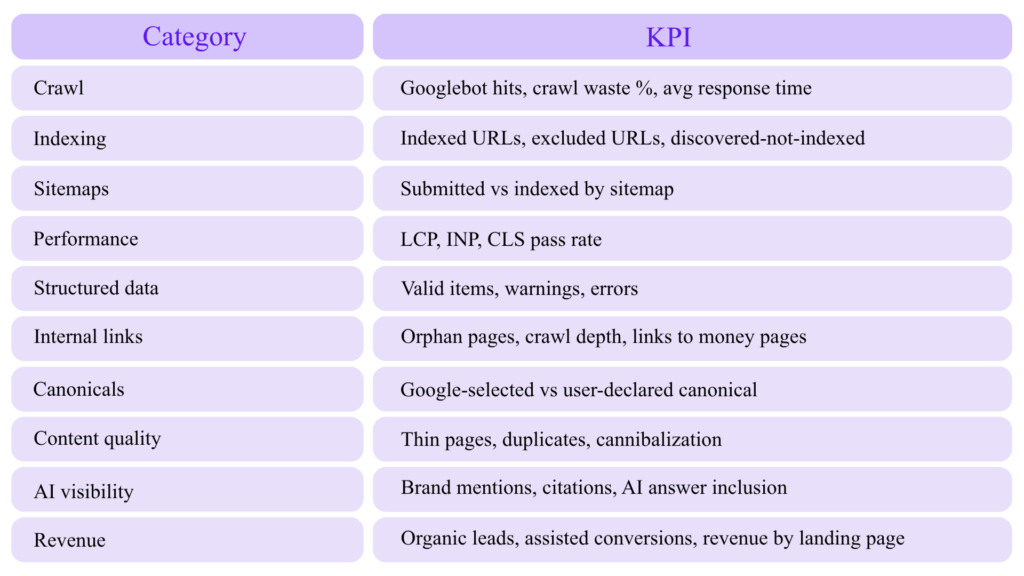
Expert Technical SEO Metrics Dashboard
Track these monthly:
Common Advanced Technical SEO Mistakes
Mistake 1: Adding Schema Without Strategy
Schema should describe the page and connect entities. It should not be decorative code.
Mistake 2: Blocking Duplicates in Robots.txt Before Google Sees Canonicals
If Google cannot crawl the page, it may not see the canonical tag.
Mistake 3: Putting Noindex URLs in XML Sitemaps
This sends conflicting signals.
Mistake 4: Relying on AI Tools Without Validation
AI can classify and summarize, but it can also hallucinate. Always validate with crawlers, Search Console, logs, and manual review.
Mistake 5: Treating Core Web Vitals as a One-Time Project
Performance changes with every script, design change, CMS update, plugin, ad tag, and tracking pixel.
Mistake 6: Ignoring Rendered HTML
If your SEO-critical content appears only after JavaScript execution, audit it carefully.
Mistake 7: Measuring Technical SEO Without Business Outcomes
A technically perfect page that does not attract, convert, or support authority is not the goal.
A 30-Day Advanced Technical SEO Action Plan
Week 1: Crawl and Indexation Baseline
- Run a full crawl.
- Export indexable/non-indexable URLs.
- Pull Search Console page data.
- Segment XML sitemaps.
- Identify sitemap/indexability conflicts.
- Check canonical consistency.
- Review robots.txt.
- Identify top crawl traps.
Week 2: Structured Data and Entity Audit
- Validate schema templates.
- Build entity graph model.
- Fix Organization, WebSite, Breadcrumb, Article, Product/Service schema.
- Compare schema to visible content.
- Test with Rich Results Test and Schema Markup Validator.
- Add schema QA to deployment workflow.
Week 3: Crawl Budget and Logs
- Analyze server logs.
- Calculate crawl waste.
- Identify high-waste URL patterns.
- Fix redirect chains.
- Reduce parameter crawling.
- Remove non-canonical URLs from sitemaps.
- Improve internal links to priority pages.
Week 4: AI Audit Layer and Monitoring
- Use AI to cluster duplicate intent pages.
- Generate internal linking opportunities.
- Detect thin or off-topic pages.
- Create alerts for noindex, robots, sitemap, schema, and CWV regressions.
- Build a monthly technical SEO dashboard.
Final Expert Checklist
Advanced Technical SEO Checklist
Crawl Optimization
[ ] XML sitemaps include only canonical, indexable 200 URLs
[ ] Sitemap index segmented by template/page type
[ ] Robots.txt used for crawl control, not canonicalization
[ ] Parameter and faceted URL strategy documented
[ ] Server logs reviewed monthly
[ ] Crawl waste percentage tracked
Indexation Control
[ ] Canonicals align with internal links, redirects, sitemaps, hreflang, and schema
[ ] Noindex pages excluded from sitemaps
[ ] Redirect chains removed
[ ] Soft 404s identified
[ ] Google-selected canonicals monitored
Structured Data
[ ] JSON-LD implemented
[ ] Organization and WebSite entities use stable @id
[ ] Breadcrumb schema deployed
[ ] Article/Product/Service schema matches page type
[ ] Schema content matches visible content
[ ] Rich Results Test and Schema Markup Validator used
JavaScript SEO
[ ] SEO-critical content available in initial HTML or reliably rendered
[ ] Internal links crawlable
[ ] Metadata not dependent on delayed JS
[ ] Lazy-loaded content tested
[ ] Hydration errors monitored
Performance
[ ] LCP ≤ 2.5s
[ ] INP ≤ 200ms
[ ] CLS ≤ 0.1
[ ] Template-level CWV monitored
[ ] Third-party scripts reviewed
AI SEO Auditing
[ ] Crawl exports classified with AI
[ ] AI findings validated manually
[ ] Internal link opportunities generated with semantic clustering
[ ] Schema drafts reviewed before deployment
[ ] AI content not published at scale without original value
Monitoring
[ ] Search Console checked weekly
[ ] Crawl Stats reviewed for large sites
[ ] URL Inspection API used carefully
[ ] Robots.txt monitored
[ ] Sitemap errors monitored
[ ] Schema enhancement reports monitored
Conclusion: Technical SEO Is Now Machine Communication
Advanced technical SEO is no longer just about fixing errors. It is about communicating clearly with search engines, AI systems, crawlers, browsers, and users.
The winners in modern SEO will be the websites that are:
- Easy to crawl
- Easy to render
- Easy to understand
- Technically consistent
- Fast for real users
- Structured around entities
- Supported by clean schema
- Audited with AI but validated by experts
- Built around useful, trustworthy content
AI tools can make technical SEO faster, but expertise still decides what matters. The best SEO teams will use AI to process data at scale, then apply human judgment to prioritize fixes that improve crawl efficiency, indexation, visibility, and business outcomes.