👋
Blog Post
On-Page SEO Checklist for 2026
The complete, modern playbook for rankings, clicks, crawlability, and AI-era visibility
Share

OnPage SEO Checklist for 2026
On-page SEO in 2026 is no longer just about “placing the keyword in the H1.” The pages that win are the pages that do four things at once:
1. Satisfy the searcher faster than competing pages
2. Make it easy for Google and other search systems to understand the page
3. Earn the click when the page appears in a crowded SERP
4. Deliver a better experience after the click than the average result
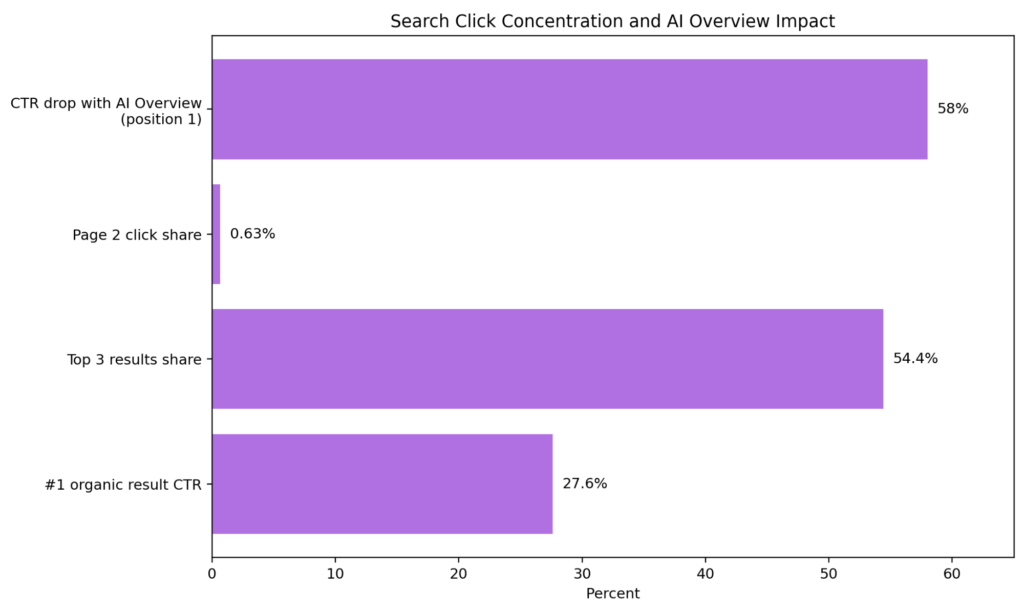
That shift matters because modern search results are more compressed and more competitive than they used to be. Backlinko’s analysis of 4 million Google search results found that the #1 organic result gets 27.6% of all clicks, the top 3 results get 54.4% of clicks, and only 0.63% of searchers click something on page two. At the same time, Ahrefs’ February 2026 update reported that, for keywords that trigger AI Overviews, the top-ranking page saw a roughly 58% lower average CTR than expected.
So the real objective of on-page SEO now is not merely “be indexed.” It is to build a page that is more understandable, more clickable, more useful, and more defensible than the alternatives.
Google’s own documentation points in the same direction. Google explicitly says its systems seek to reward helpful, reliable, people-first content and good page experience, rather than pages created primarily to manipulate rankings. That makes a modern on-page SEO checklist broader than metadata alone. It now includes content depth, information gain, page structure, schema, internal links, image clarity, rendering, mobile parity, and user experience.
The 2026 Reality in Charts
1) Search clicks are more concentrated than ever
2) Technical on-page best practices are becoming defaults
The 2026 On-page SEO Checklist
If you only remember one thing, remember this:
“The best-performing pages in 2026 combine search intent alignment, strong title/snippet packaging, clean internal linking, correct structured data, solid technical hygiene, and a fast, frustration-free experience.“
Here is the short version of the checklist before we go deep:
- Match the page to a clear search intent
- Lead with an original, useful answer
- Demonstrate first-hand expertise and trust signals on the page
- Write a unique, descriptive title tag
- Write a page-specific meta description
- Use short, readable URLs
- Use a clear H1 and scannable H2/H3 structure
- Put key entities, answers, and supporting evidence near the top
- Add descriptive internal links and sensible anchor text
- Link out where it improves trust or context
- Optimize images with descriptive filenames and alt text
- Add the right structured data in JSON-LD
- Use breadcrumbs where hierarchy matters
- Set canonicals correctly
- Control indexing with meta robots, not robots.txt alone
- Make JavaScript content renderable and lazy loading crawl-safe
- Improve Core Web Vitals and overall page experience
- Ensure mobile parity for content, metadata, images, and schema
- Refresh important pages as facts, intent, and SERPs evolve
- Validate everything in Search Console, Rich Results Test, and PageSpeed Insights
Now let’s break each part down properly.
1) Start with search intent, not keywords

Most on-page SEO failures are intent failures.
A page can have the keyword in the title, H1, URL, alt text, and internal anchors and still underperform because it solves the wrong problem. In 2026, Google’s language systems are sophisticated enough that exact-match repetition matters far less than topic fit, task completion, and usefulness.
Google’s guidance is blunt: create content for people, not content designed primarily to attract search engine traffic. The best starting question is not “what keyword do I want to rank for?” It is:
What does the searcher actually want done when they type this query?
Usually, intent falls into one of these buckets:
- Informational: the user wants to learn
- Commercial investigation: the user wants to compare options
- Transactional: the user wants to buy, book, register, or contact
- Navigational: the user wants a specific brand or page
What to do on-page?
- Make sure the page format matches the query class. A buyer’s guide should not look like a glossary definition page.
- Put the expected answer in the top section of the page.
- Align headings, examples, screenshots, comparisons, FAQs, and CTAs to the actual task the user is trying to complete.
- Study the current SERP before writing. If Google shows listicles, comparisons, FAQs, product grids, or videos, those are clues about expected format.
The 2026 standard
Do not build one page that tries to do all intents at once. Pages rank better when they are decisive.
A good test is this: if someone lands on your page in 5 seconds, can they tell:
- what the page covers,
- who it is for,
- what answer or action they will get,
- and why they should trust it?
If not, your page is under-optimized before the technical work even starts.
2) Make the page genuinely useful and original
Google’s SEO Starter Guide says compelling and useful content is likely to influence your presence in search results more than almost anything else in the guide. It also says the content should be unique, up to date, and helpful, reliable, and people-first.
That means a 2026 on-page checklist must include information gain. In plain English: your page should not just say the same things the top 10 pages already say.
What original content looks like in practice
- First-hand examples
- Screenshots, test results, or process walkthroughs
- Original frameworks or checklists
- Opinionated trade-offs
- Data interpretation, not just data repetition
- Real product usage notes
- A clear “who this is for / not for” section
- Common mistakes or edge cases that generic articles miss
Google also asks whether content is written or reviewed by someone who demonstrably knows the topic well, whether it makes readers trust it, and whether it contains easily verified factual errors. That is why author information, methodology, sourced claims, and update dates belong on the page when appropriate.
On-page trust signals to add
- Author byline with expertise or role
- “Last updated” date when freshness matters
- Clear sourcing for statistics and claims
- About-page or editorial-policy links
- Product testing or methodology notes
- Reviewer or editor attribution on sensitive topics
A common mistake
Do not confuse “long” with “helpful.” Google explicitly says there is no magical word count target for ranking. If a page takes 3,000 words to answer a 600-word question, it is probably bloated.
3) Put the answer early and structure the page for fast comprehension
Searchers skim first. Search systems also benefit when the page signals its main topic and supporting subtopics quickly.
That means your page should usually do this near the top:
- Confirm the topic in the H1
- Give the short answer or promise immediately
- Preview the scope of the page
- Establish why the page can be trusted
- Create an easy scan path into the rest of the content
A practical opening-page formula
1. H1
2. 2–4 sentence answer-first intro
3. Key takeaway box / summary / quick checklist
4. Jump links or table of contents for long pages
5. Main body sections
This is especially effective in an AI-overview world. If traditional clicks are being squeezed, your page needs to prove value instantly when it does win the visit.

4) Optimize title tags for clarity and click-through rate
Google says title links are critical because they are often the primary piece of information people use to decide which result to click. Google also says it uses multiple sources to determine title links, not just the `<title>` element, so the goal is to provide a strong, consistent signal.
Title tag best practices for 2026
- Make every page title unique
- Be descriptive and concise
- Front-load the main topic where natural
- Reflect the page’s actual content
- Avoid vague titles like “Home” or “Services”
- Avoid keyword stuffing
- Align the title with the page heading and intent
Backlinko’s CTR study found that title tags between 40 and 60 characters had a 33.3% higher CTR than titles outside that range. That does not mean you should force every title into 60 characters. Google says there is no technical limit on title length, and titles are truncated as needed to fit device width. The smarter takeaway is:
Aim for clarity first, and keep titles tight enough that the key value proposition is visible early.
Strong title examples
- On-Page SEO Checklist for 2026: What Actually Matters Now
- Core Web Vitals for Ecommerce: Fix LCP, INP, and CLS Without Guesswork
- Canonical Tags Explained: When to Use Them and When Not To
Weak title examples
- SEO Checklist
- Marketing Blog
- SEO SEO Checklist 2026 Best On Page SEO Checklist
5) Write meta descriptions as ad copy, not as a ranking hack
Google says snippets are primarily created from page content, but it may use the meta description when that description better matches the page than on-page text does. That means meta descriptions are not direct ranking factors, but they still matter for click qualification and snippet quality.
What makes a good meta description
- Unique to the page
- Accurate, not generic
- Naturally aligned with the page content
- Useful to the searcher
- Includes key information that helps a decision
- Written like a compact pitch, not a keyword dump
Google recommends page-specific descriptions and says programmatic generation can be appropriate for large sites if the output remains human-readable and diverse.
A practical formula
What it is + who it helps + what is included + why it is useful
Example: Learn the on-page SEO checklist that actually matters in 2026, including titles, schema, internal links, Core Web Vitals, JavaScript SEO, canonicals, and measurement.
Important nuance
Do not obsess over character count as if it were a fixed rule. Google says there is no limit on meta description length, though snippets are truncated to device width.
We wrote a practical, beginner-friendly digital marketing guide for small businesses. It covers everything from SEO to Paid Ads. Have a quick read & implement to scale your business.
6) Use clean, readable URLs
Google recommends a simple URL structure with readable words rather than long ID numbers. It also recommends using your audience’s language and keeping parameters to a minimum where possible.
Good URL rules
- Keep slugs short and descriptive
- Use words, not gibberish
- Use hyphens to separate words
- Avoid unnecessary dates unless strategically useful
- Avoid parameter-heavy URLs for canonical versions
- Keep the slug stable once the page earns links
Good:
`/on-page-seo-checklist-2026/`
Less ideal:
`/blog?id=4827&cat=seo&year=2026&ver=4`
Readable URLs help users, improve SERP comprehension, and make site architecture cleaner.
7) Use headings for organization, not superstition
Headings still matter, but not for the reasons many old SEO checklists claim.
Google’s Starter Guide says:
- there is no magical ideal amount of headings, and
- from Google Search’s perspective, heading order itself does not matter the way many people think it does.
What headings do matter for is:
- user scanning,
- accessibility,
- page structure,
- subtopic coverage,
- and making long content easier to navigate.
Best practice
- Use one clear H1
- Use H2s for major sections
- Use H3s for subpoints
- Write headings that help users predict what comes next
- Use headings to reduce cognitive load, not just to place keywords
A good heading structure also helps you surface adjacent intent and semantically related concepts without stuffing.
8) Improve internal linking and anchor text
Google says links help it discover pages and assess relevance. It also says anchor text tells users and Google something about the page you’re linking to. That makes internal links one of the highest-leverage on-page SEO tools you fully control.
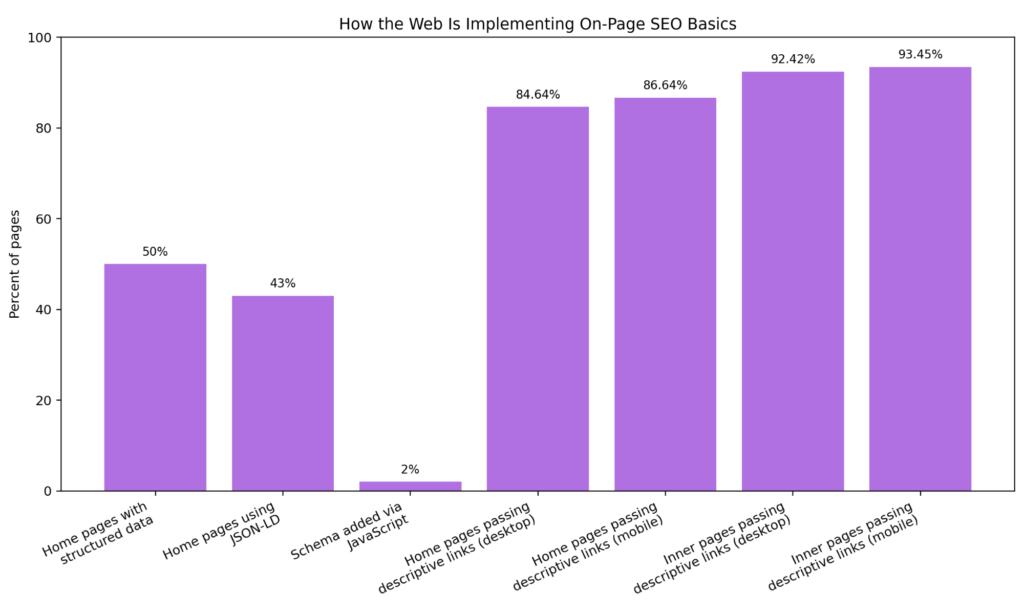
The 2025 Web Almanac found that descriptive link practices are already fairly mature across the web: pages with descriptive link text were common, especially on inner pages. That is useful context because it means weak anchors are increasingly a competitive disadvantage, not merely a missed opportunity.
Internal linking goals
- Help crawlers find and prioritize important pages
- Help users move logically through related content
- Distribute authority toward strategic pages
- Clarify topic relationships
- Support clusters, hubs, and conversion paths
Best practices
- Use real `<a href=””>` links that Google can crawl.
- Use descriptive anchor text, not “click here” everywhere.
- Link from high-authority pages to pages that need a boost
- Add related links inside the body, not only in nav/footer
- Update internal links when publishing new content
- Use image alt text carefully when images are links, because Google can treat alt text as anchor text.
Smart internal-link placements
- Intro sections for key definitions
- Mid-article contextual examples
- “Next step” blocks after problem/solution sections
- Related tools, templates, calculators, product pages, and case studies
9) Link out when it improves trust and usefulness
Some marketers still avoid external links out of fear of “leaking SEO value.” That is usually the wrong mindset.

Google’s Starter Guide says links can add value by connecting users and Google to another resource that corroborates what you are writing about. In a people-first framework, relevant external citations often strengthen trust.
Good reasons to add external links
- To cite original research
- To reference official documentation
- To support a claim or definition
- To point readers to regulations, standards, or tools
- To distinguish your interpretation from the source material
Just make sure the resource is trustworthy. If you do not trust a destination but still need to reference it, use `nofollow` or similar annotations where appropriate.
10) Optimize images for meaning, accessibility, and discoverability
Google says it uses the content around an image, the page context, captions, filenames, and especially alt text to understand the image’s subject matter.
Image SEO checklist
- Use descriptive filenames
- Place images near relevant text
- Write descriptive alt text where appropriate
- Avoid keyword stuffing in alt text
- Use high-quality images on mobile and desktop
- Keep image URLs stable
- Add captions when they help interpretation
- Consider image sitemaps if discovery is difficult
Google specifically says alt text is the most important attribute for providing image metadata and that it improves accessibility as well. It also says mobile pages should use the same alt text, titles, captions, filenames, and relevant image text as desktop pages.
The 2025 Web Almanac noted that at the median, 15% of images were missing alt attributes, suggesting the web is improving, but meaningful alt text still has room to mature.
Good alt text example
`alt=”Google Search Console performance report showing clicks and impressions trend”`
Bad alt text example
`alt=”seo seo rankings best seo image google rankings traffic agency marketing”`
11) Add structured data that matches the page type
Structured data is one of the clearest on-page signals you can give search engines. Google says it uses structured data to understand page content and make pages eligible for richer search appearances.
Google generally recommends JSON-LD because it is easier to implement and maintain at scale. That recommendation lines up with the 2025 Web Almanac, which found:
- **50%** of home pages used structured data,
- **43%** used JSON-LD,
- and only **2%** injected structured data via JavaScript.
That last point matters: while Google can process JavaScript-injected schema, the Web Almanac notes that placing structured data in initial HTML helps avoid delays and crawling issues.
What schema to consider
Choose schema based on the actual page:
- `Article` / `BlogPosting`
- `Product`
- `FAQPage`
- `BreadcrumbList`
- `Organization`
- `WebSite`
- `LocalBusiness`
- `VideoObject`
- `Recipe`
- `Course`
- `Dataset`
- and other supported types in Google’s Search Gallery
Rules to follow
- Use schema only when it matches visible page content
- Do not add data that users cannot see on the page
- Validate in Rich Results Test and Schema Markup Validator
- Monitor Search Console rich result reports after deployment
Important caveat
Structured data does not guarantee a rich result. It makes your page eligible.
12) Use breadcrumbs and strengthen hierarchy
Breadcrumbs help both users and search systems understand a page’s position within a site structure. Google says breadcrumb markup helps categorize information in search results.
Why breadcrumbs matter
- Stronger hierarchy signals
- Better user orientation on large sites
- Clearer parent-child relationships
- Potential breadcrumb display in SERPs
- Support for scalable information architecture
They are especially helpful for ecommerce, publishers, SaaS knowledge centers, and large blog archives.
At Full Traffic, we specialise in SEO Services – focussed on conversions over rankings. Hit the button below to know more.
13) Fix duplicates and canonicalize strategically
Duplicate or near-duplicate URLs still create confusion, especially on ecommerce, filtered navigation, pagination variants, tracking URLs, print pages, and CMS-generated duplicates.
Google says canonicalization is the process of selecting the representative URL from a set of duplicates. It also says duplicate content is not itself a spam violation, but it can be a bad user experience and waste crawl resources.
Canonical checklist
- Each important page should have a self-referencing canonical unless there is a good reason not to
- Faceted/filter URLs should not compete with core category pages unless intentionally indexed
- Avoid conflicting signals between canonicals, redirects, sitemaps, and internal links
- Use redirects when a duplicate version no longer needs to exist
- Use `rel=”canonical”` when multiple URLs must remain live
Common canonical mistakes
- Canonicalizing to a page with different intent
- Mixing canonicals and `noindex` carelessly
- Canonicalizing paginated or filtered pages incorrectly
- Letting internal links point to non-canonical variants
14) Control indexing with the right tool
A surprising number of SEO problems still come from using the wrong control for the job.
Google’s robots.txt guide is explicit: robots.txt is not a mechanism for keeping a web page out of Google. If you want to prevent indexing, use `noindex` or password protection.
Use this rule of thumb
- robots.txt = crawl management
- meta robots / X-Robots-Tag = indexing and snippet control
- canonical = duplicate consolidation preference
- redirect = consolidation plus destination change
Google’s robots meta tag documentation supports granular controls like `noindex`, `nosnippet`, and `max-snippet`.
Good use cases
- `noindex` thin search result pages, internal search URLs, thank-you pages
- `nosnippet` or `data-nosnippet` for sensitive on-page sections
- `max-snippet` for tighter snippet control
- Password-protect pages that should truly stay private
15) Make JavaScript SEO-safe
Google can process JavaScript, but “Google can render JS” is not the same thing as “your JavaScript implementation is SEO-safe.”
Google says it processes JavaScript-powered pages in three phases: crawling, rendering, and indexing. It also warns that dynamic rendering was a workaround, not a recommended long-term solution; server-side rendering, static rendering, or hydration are preferable where appropriate.
JavaScript on-page checklist
- Ensure critical content is present in rendered HTML
- Use crawlable `<a href=””>` links, not JS-only click handlers
- Avoid hiding important content behind interaction states Google may miss
- Test rendered HTML, not just source HTML
- Do not rely on dynamic rendering as your preferred architecture
- Make sure canonicals, meta robots, titles, and structured data render correctly
Lazy-loading rule
Google says lazy loading is fine, but if implemented incorrectly it can hide content from Google. Load content when it becomes visible in the viewport and use browser-native lazy loading or IntersectionObserver-based approaches correctly.
16) Treat Core Web Vitals and page experience as on-page SEO
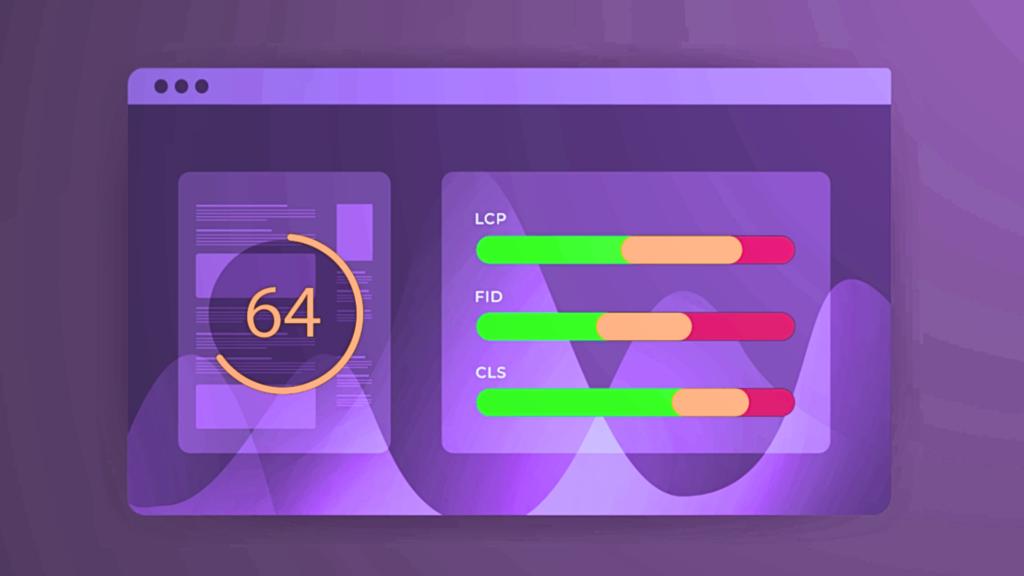
Page experience is not separate from on-page SEO anymore. It is part of the page’s ability to compete.
Google says Core Web Vitals are used by its ranking systems and strongly recommends achieving good CWV for success in Search and user experience overall. It also says there is no single page experience signal; rather, systems look at a variety of signals aligned with overall page experience.
As of September 2025, Addy Osmani summarized CrUX data showing 53% of origins passed all three Core Web Vitals (LCP, INP, CLS). That means nearly half the web still fails the full standard.
Good thresholds
- LCP: ≤ 2.5s
- INP: ≤ 200ms
- CLS: ≤ 0.1
On-page experience checklist
- Improve Largest Contentful Paint
- Reduce JavaScript long tasks affecting INP
- Prevent layout shifts with reserved dimensions and stable UI
- Serve pages securely over HTTPS
- Make pages display well on mobile
- Avoid intrusive interstitials
- Make the main content easy to distinguish from ads or other modules
Why this matters commercially
web.dev’s business-impact case studies show performance improvements can correlate with real outcomes, including:
- Tencent Video: 70% better CTR after passing CWV
- Nykaa: 40% LCP improvement leading to 28% more organic traffic from T2/T3 cities
- Cdiscount: 6% revenue uplift
- Yahoo! Japan: 15% uplift in page views per session after CLS improvements
You do not need a perfect Lighthouse score. Google explicitly warns that chasing perfect scores solely for SEO may not be the best use of time. But you do need a page that feels fast, stable, and frustration-free.
17) Maintain mobile parity
Google’s indexing is mobile-first, so your mobile page is not a secondary version. It is the version that must fully represent the page.
Google’s mobile-first indexing documentation says mobile pages should have the same content quality, same structured data, same metadata, and same image signals as desktop pages.
Mobile parity checklist
- Same primary content
- Same headings
- Same title and meta description
- Same structured data
- Same internal links where reasonable
- Same alt text and captions
- High-quality images on mobile
- No hidden or stripped critical copy
- No mobile-specific `noindex`
- Avoid resources blocked via robots.txt that are needed for rendering
18) Refresh pages for freshness, changing SERPs, and AI visibility
Freshness is not equally important for every query, but on many topics, stale content becomes less competitive over time.
Google says previously published content should be checked and updated as needed, or deleted if it is no longer relevant. Ahrefs’ December 2025 research also found that AI assistants tend to cite content that is 25.7% fresher than traditional organic results, with ChatGPT showing the strongest preference for newer cited URLs.
Refresh signals to review
- Outdated stats
- Old screenshots or product UI
- Changed search intent
- Missing newer subtopics
- Broken links
- Weak internal linking
- Declining CTR despite stable rankings
- Rising impressions but weak engagement
- Page now outranked by fresher competitor content
High-impact refreshes
- Rewrite intros and titles
- Add new examples and data
- Tighten structure
- Improve schema
- Add comparison sections
- Update FAQs based on Search Console queries
- Refresh images and charts
In 2026, refresh work is often a better ROI move than endless net-new publishing.
19) Localize and internationalize correctly
If your site targets multiple markets, on-page SEO includes language and locale accuracy.
Google warns that locale-adaptive pages can cause crawling and indexing problems because Googlebot may not see the right localized variant if content changes based on perceived location or browser language.
Better international on-page practices
- Use separate URLs for major language/country variants where practical
- Implement hreflang correctly
- Localize titles, headings, copy, and structured data where relevant
- Use the audience’s language in URLs when appropriate
- Avoid serving materially different content from a single adaptive URL without a solid international strategy
20) Validate, test, and measure every important page
On-page SEO is not “done” when the page is published. It is done when the page is:
- crawlable,
- indexable,
- understandable,
- eligible for enhancements,
- fast enough,
- and producing the expected click and engagement outcome.
The core validation stack
- Google Search Console for impressions, clicks, indexing, CWV, and rich results
- URL Inspection Tool for canonical choice, indexing state, and rendered page checks
- Rich Results Test for Google-specific structured data validation
- Schema Markup Validator for general schema validation
- PageSpeed Insights for field and lab performance analysis
- Lighthouse for debugging page experience issues
Metrics to watch
- Rankings by intent cluster
- Impressions
- Organic CTR
- Scroll depth / engagement
- Conversion rate
- CWV status
- Indexed vs. submitted pages
- Rich result eligibility and errors
- Internal-link coverage to strategic pages
The fastest on-page SEO wins for most websites
If you need impact quickly, start here:
Highest-ROI fixes
1. Rewrite weak title tags on pages already ranking in positions 2–10
2. Improve intros so the answer appears immediately
3. Add contextual internal links from strong pages to money pages
4. Add or fix structured data on pages eligible for rich results
5. Repair duplicate title/meta description problems at template level
6. Compress hero assets and improve LCP on high-traffic landing pages
7. Fix missing or poor alt text on important images
8. Add self-referencing canonicals and clean up variant URLs
9. Improve mobile parity on stripped-down templates
10. Refresh aging high-impression pages with new evidence and screenshots
These changes often move the needle faster than publishing five more generic blog posts.
Common on-page SEO myths to leave behind in 2026
Myth 1: E-E-A-T is a direct ranking factor
Google’s SEO Starter Guide says plainly: “No, it’s not.”
The better interpretation is that strong expertise, experience, and trust signals help align with what Google’s systems try to reward.
Myth 2: There is a perfect word count
There is not.
Myth 3: Headings must be in a rigid order to rank
Not from Google Search’s perspective. Use a logical heading structure for users and accessibility.
Myth 4: Meta descriptions directly improve rankings
They influence snippets and CTR, not direct rankings in the simplistic way old guides often claim.
Myth 5: robots.txt removes pages from Google
It does not reliably do that.
Myth 6: More keywords in the title always means better SEO
Google explicitly warns against keyword stuffing in titles.
Myth 7: Schema guarantees rich results
It only makes pages eligible.
A Copy/Paste On-Page SEO Checklist for Your Team
Content & Intent
- One primary intent per page
- Answer-first opening
- Unique information, examples, or analysis
- Clear audience fit
- Expert or first-hand perspective where needed
- Sources or evidence for important claims
- Updated facts and screenshots
Metadata
- Unique title tag
- Unique meta description
- One clear H1
- Readable URL slug
- Canonical set correctly
- Meta robots rules correct
Structure & Links
- Logical H2/H3 structure
- Body links to relevant internal pages
- Descriptive anchor text
- External citations where helpful
- Breadcrumbs if hierarchy matters
Images & Media
- Descriptive filenames
- Descriptive alt text
- High-quality mobile-safe assets
- Video schema where relevant
- Image context and captions where useful
Structured Data
- Right schema type for the page
- JSON-LD preferred
- Matches visible content
- Valid in Rich Results Test
- Monitored in Search Console
Rendering & Performance
- Important content visible in rendered HTML
- Crawlable HTML links
- Lazy loading implemented safely
- Good CWV targets
- HTTPS enabled
- No intrusive interstitials
- Mobile parity maintained
Measurement
- Indexed and canonicalized as intended
- CTR monitored
- Rich result status checked
- CWV monitored
- Page refreshed on schedule
Final takeaway
The winning on-page SEO strategy in 2026 is not a bag of tricks. It is a system.
A strong page:
- solves the right problem,
- presents the answer clearly,
- earns trust quickly,
- is packaged to win the click,
- is easy for crawlers to interpret,
- and delivers a better post-click experience than the average competing result.
That is why the modern checklist spans content, metadata, structure, schema, rendering, mobile parity, and performance. The fundamentals still matter. In fact, they matter more now because AI-overview SERPs, richer interfaces, and higher competition make every weak page easier to ignore.
If your page is useful, clear, technically clean, well-linked, well-labeled, and fast, you are not just “doing on-page SEO.” You are building the kind of page modern search systems are designed to reward.